FetchXML is useful in that you can create queries through the Dynamics 365 user interface, and queries can include aggregates (sum, avg, min, max, count). Here we will go through an example of using FetchXML in C# through a console app.
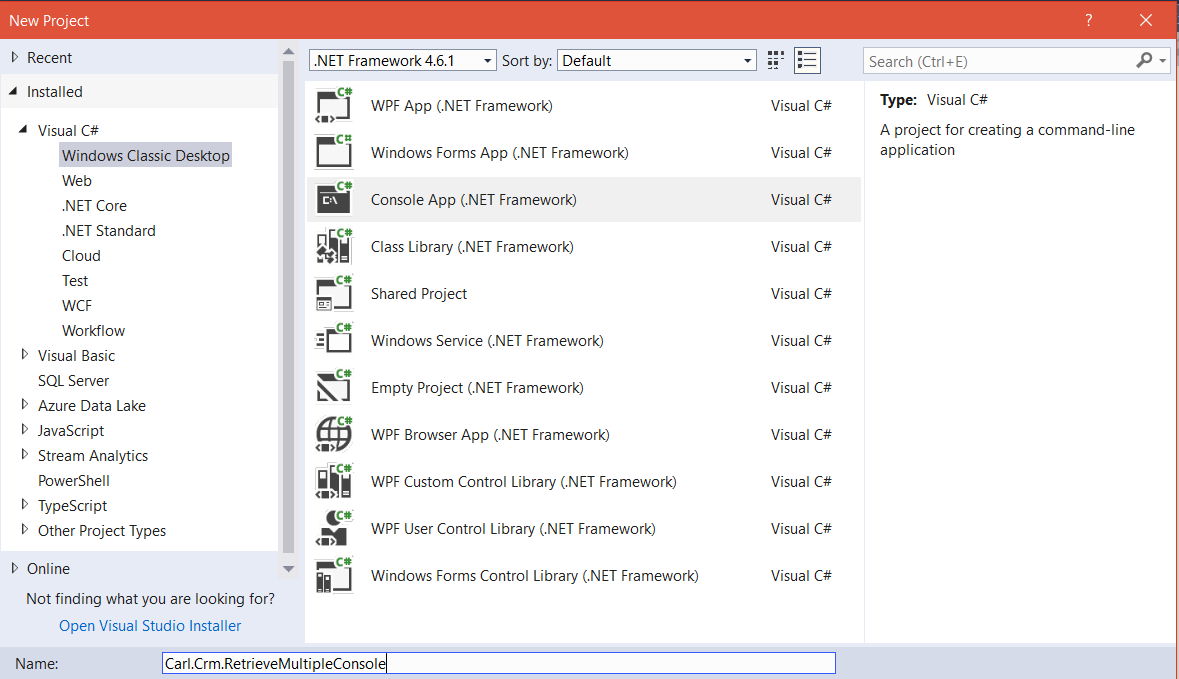
First, create a new console app in Visual Studio:
Add assemblies:
- Microsoft.Xrm.Tooling.Connector
- Microsoft.Xrm.Sdk
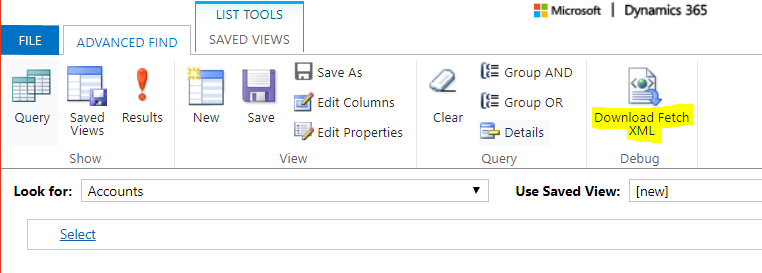
In our example, we will retrieve multiple accounts. We will create some FetchXML. Go to Dynamics 365 and select a query. Note the ability to download the FetchXML:
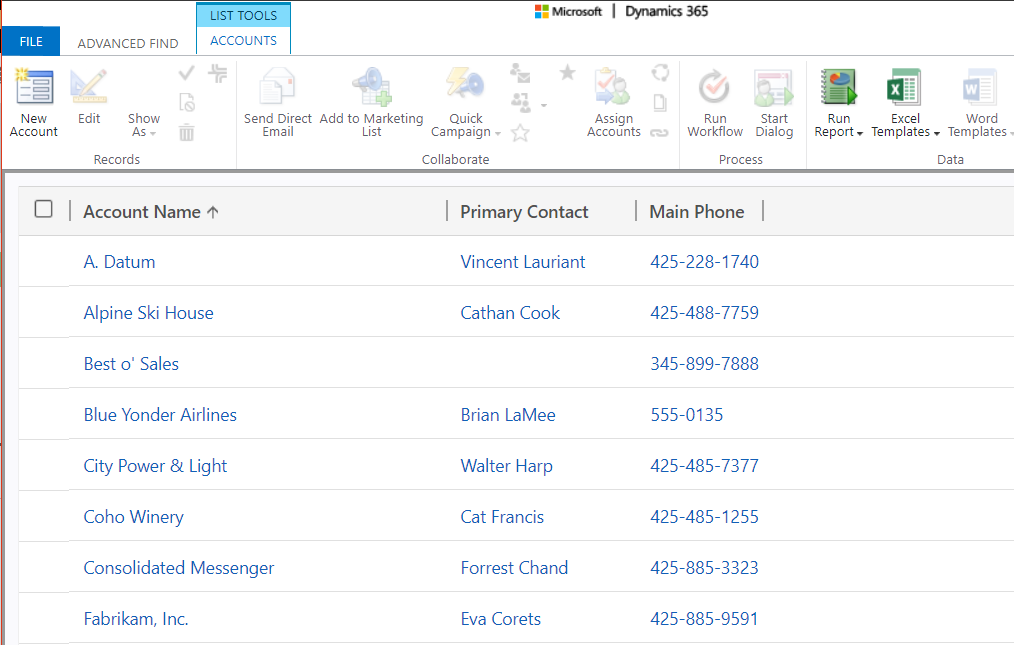
If we run this query, we can see the results that will be returned:
Open the downloaded file to see the XML:
[sourcecode language=”xml”] <fetch version="1.0" output-format="xml-platform" mapping="logical" distinct="false"><entity name="account">
<attribute name="name" />
<attribute name="primarycontactid" />
<attribute name="telephone1" />
<attribute name="accountid" />
<order attribute="name" descending="false" />
</entity>
</fetch>
[/sourcecode]
Now, replace all the double quotes with single quotes:
[sourcecode language=”xml”] <fetch version=’1.0′ output-format=’xml-platform’ mapping=’logical’ distinct=’false’><entity name=’account’>
<attribute name=’name’ />
<attribute name=’primarycontactid’ />
<attribute name=’telephone1′ />
<attribute name=’accountid’ />
<order attribute=’name’ descending=’false’ />
</entity>
</fetch>
[/sourcecode]
Now, we will add this to our C# console app code:
[sourcecode language=”csharp”] using System;using System.Collections.Generic;
using System.Linq;
using System.Text;
using System.Threading.Tasks;
using Microsoft.Xrm.Sdk;
using Microsoft.Xrm.Sdk.Query;
using Microsoft.Crm.Sdk.Messages;
using Microsoft.Xrm.Tooling.Connector;
using System.ServiceModel;
namespace Carl.Crm.RetrieveMultipleConsole
{
class Program
{
static void Main(string[] args)
{
try
{
var connectionString = @"AuthType = Office365; Url = https://yourcrm.crm.dynamics.com/;Username=your@email.com;Password=yourpassword";
CrmServiceClient conn = new CrmServiceClient(connectionString);
IOrganizationService service = (IOrganizationService)conn.OrganizationWebProxyClient != null ? (IOrganizationService)conn.OrganizationWebProxyClient : (IOrganizationService)conn.OrganizationServiceProxy;
string fetchquery = @"<fetch version=’1.0′ output-format=’xml-platform’ mapping=’logical’ distinct=’false’>
<entity name=’account’>
<attribute name=’name’ />
<attribute name=’primarycontactid’ />
<attribute name=’telephone1′ />
<attribute name=’accountid’ />
<order attribute=’name’ descending=’false’ />
</entity>
</fetch>";
EntityCollection accounts = service.RetrieveMultiple(new FetchExpression(fetchquery));
foreach (var c in accounts.Entities) {
Console.WriteLine("Name: {0}", c.Attributes["name"]);
}
}
catch (Exception ex)
{
Console.WriteLine(ex.ToString());
}
Console.ReadLine();
}
}
}
[/sourcecode]
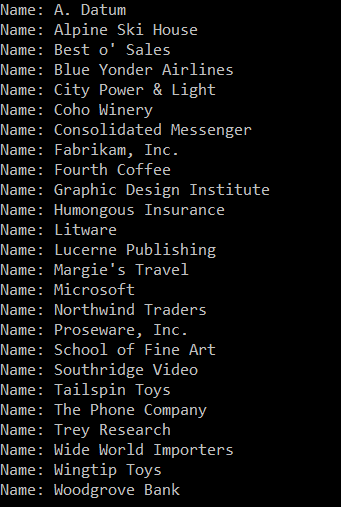
This outputs:
Now, let’s change the query to a count. The FetchXML looks like:
[sourcecode language=”xml”] <fetch distinct=’false’ mapping=’logical’ aggregate=’true’ ><entity name=’account’ >
<attribute name=’accountid’ alias=’accountid’ aggregate=’count’ />
</entity>
</fetch>
[/sourcecode]
The full code:
[sourcecode language=”csharp”] using System;using System.Collections.Generic;
using System.Linq;
using System.Text;
using System.Threading.Tasks;
using Microsoft.Xrm.Sdk;
using Microsoft.Xrm.Sdk.Query;
using Microsoft.Crm.Sdk.Messages;
using Microsoft.Xrm.Tooling.Connector;
using System.ServiceModel;
namespace Carl.Crm.RetrieveMultipleConsole
{
class Program
{
static void Main(string[] args)
{
try
{
var connectionString = @"AuthType = Office365; Url = https://yourcrm.crm.dynamics.com/;Username=your@email.com;Password=yourpassword";
CrmServiceClient conn = new CrmServiceClient(connectionString);
IOrganizationService service = (IOrganizationService)conn.OrganizationWebProxyClient != null ? (IOrganizationService)conn.OrganizationWebProxyClient : (IOrganizationService)conn.OrganizationServiceProxy;
string fetchxmlquery = @"
<fetch distinct=’false’ mapping=’logical’ aggregate=’true’>
<entity name=’account’>
<attribute name=’accountid’ alias=’account_count’ aggregate=’count’/>
</entity>
</fetch>";
EntityCollection account_count = service.RetrieveMultiple(new FetchExpression(fetchxmlquery));
foreach (var c in account_count.Entities)
{
Int32 count = (Int32)((AliasedValue)c["account_count"]).Value;
System.Console.WriteLine("Count of all accounts: " + count);
}
}
catch (Exception ex)
{
Console.WriteLine(ex.ToString());
}
Console.ReadLine();
}
}
}
Running this, we get:


Explore AI, agents & Microsoft technology.
I share practical ideas, tutorials, and videos about AI, AI agents, Microsoft technologies, and the Power Platform.
Subscribe on YouTube →
Excellent introduction to C# FetchXML. Thanks!
Hi Carl
Is this code still going to work with the newer versions of CRM online?
Regards
Andy
Hi Carl, I tried the code on new UCI environment of Dynamics CRM 365 but it’s throwing error on RetrieveMultiple. Can you please help in this.
Hi Carl, I tried the code on new UCI environment of Dynamics CRM 365 online but it throws error on RetrieveMultiple can you please help.
Excellent. Thanks!