To create a console app that connects to Dynamics CRM 2015, we will use the CrmServiceClient.
Create a new Visual Studio project and add the assemblies:
- Microsoft.Crm.Sdk.Proxy
- Microsoft.Xrm.Sdk;
- Microsoft.Xrm.Tooling.Connector
In the code, add Using:
using Microsoft.Xrm.Tooling.Connector;
using Microsoft.Xrm.Sdk;
using Microsoft.Crm.Sdk.Messages;
using Microsoft.Xrm.Sdk.Query;
To connect to CRM, we will use the connection information to pass to CrmServiceClient:
  string userid = "Administrator";
 string password = "yourpassword";
 string domain = "YOURDOMAIN";
 string orgname = "CarlCo";
 string server = "localhost";
 string port = "5555";

 CrmServiceClient conn = new CrmServiceClient(new System.Net.NetworkCredential(userid, password, domain),server, port, orgname);
We can then use a QueryExpression to get data from CRM with the Organization Service:
 IOrganizationService _orgService;
 _orgService = (IOrganizationService)conn.OrganizationServiceProxy;

 QueryExpression query = new QueryExpression("contact");
 query.ColumnSet.AddColumns("firstname", "lastname");

 EntityCollection result1 = _orgService.RetrieveMultiple(query);
 foreach (var a in result1.Entities)
 {
    Console.WriteLine("Name: " + a.Attributes["firstname"] + " " + a.Attributes["lastname"]);
 }
 Console.Read();
Code can now be run:
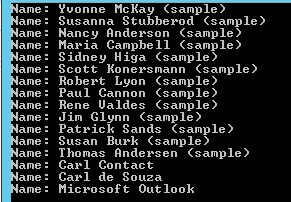
Full code:
using System;
using System.Collections.Generic;
using System.Linq;
using System.Text;
using System.Threading.Tasks;

using Microsoft.Xrm.Tooling.Connector;
using Microsoft.Xrm.Sdk;
using Microsoft.Crm.Sdk.Messages;
using Microsoft.Xrm.Sdk.Query;

namespace Carl.Crm.ConsoleApp
{
 class Program
 {
 static void Main(string[] args)
 {

 string userid = "Administrator";
 string password = "yourpassword";
 string domain = "YOURDOMAIN";
 string orgname = "CarlCo";
 string server = "localhost";
 string port = "5555";

 CrmServiceClient conn = new CrmServiceClient(new System.Net.NetworkCredential(userid, password, domain),server, port, orgname);

 IOrganizationService _orgService;
 _orgService = (IOrganizationService)conn.OrganizationServiceProxy;

 QueryExpression query = new QueryExpression("contact");
 query.ColumnSet.AddColumns("firstname", "lastname");

 EntityCollection result1 = _orgService.RetrieveMultiple(query);
 foreach (var a in result1.Entities)
 {
 Console.WriteLine("Name: " + a.Attributes["firstname"] + " " + a.Attributes["lastname"]);
 }
 Console.Read();
 }
 }
}
Keep learning. Keep building.
Explore AI, agents & Microsoft technology.
I share practical ideas, tutorials, and videos about AI, AI agents, Microsoft technologies, and the Power Platform.
Subscribe on YouTube →Carl de Souza Enterprise Architect at Microsoft · AI Technology Expert
hello,
i have been using crm 2016 onpremise version. we have wcf services which are connected to crm database. while creating or accessing data from crm, an app pool user is used. these wcf services are called from other web applications. is there any way to authenticate user who is calling the wcf service?