In Dynamics 365 / Power Apps, entity names can have various different plural extensions, such as “s”, “es”, “ies” etc. So when you’re writing code and you need the plural name of an entity dynamically, knowing only the singular name, how do you get it to ensuring you’re using the right name?
You can use Xrm.Utility.getEntityMetadata to get it. For example, with accounts below:
[sourcecode language=”JavaScript”] Xrm.Utility.getEntityMetadata("accounts", "").then(function (result) {
console.log("Entity Set Name: " + result.EntitySetName);
}, function (error) {
console.log(error);
});
[/sourcecode]
This produces:
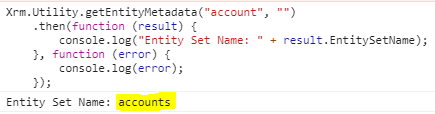
A more interesting example, let’s say you have an entity called adobe_integrationsettings which may be installed. Note this name is already plural, though it is the logical name. Running this:
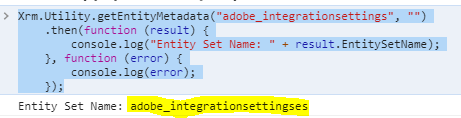
Returns a less obvious adobe_integrationsettingses.

Explore AI, agents & Microsoft technology.
I share practical ideas, tutorials, and videos about AI, AI agents, Microsoft technologies, and the Power Platform.
Subscribe on YouTube →
I remember a few other special examples:
webresource -> webresourceset, opportunitycompetitors -> opportunitycompetitorscollection.
Actually, for custom entities the EntitySetName can be changed.
So, using the metadata is the only right way to get the plural name.
Carl,
Please correct the code if required, Xrm.Utility.getEntityMetadata(“accounts”, “”) should have probably used singular, screenshot looks fine by the way.
Thanks
Rk Hirpara
Agreed, it should be this:
Xrm.Utility.getEntityMetadata(“account”, “”)
.then(function (result) {
console.log(“Entity Set Name: ” + result.EntitySetName);
}, function (error) {
console.log(error);
});