Serialization is the process of converting an object into a byte stream. Once serialized, it can be transmitted to a file, a database or to memory or send it across a network. For example, you may want to convert data to XML. Serialization allows you to store the state of the object; you can then recreate it as needed.
Let’s go through a simple example of serializing a Car object. First, we will need to create the Car class. Our Car will have make, model, year and color as properties. We will need to add [Serializable] to our class, or we will get an error that the class is not serializable later. Note we will also specify that the color property is not serializable:
using System;
using System.Collections.Generic;
using System.Linq;
using System.Text;
using System.Threading.Tasks;

namespace Carl.SerializeConsoleApp
{
    class Transportation
    {
        [Serializable]
        public class Car
        {
            public string make { get; set; }
            public string model { get; set; }
            public int year { get; set; }
            [NonSerialized]
            public string color;
        }
    }
}
Now, we can add code to perform the serialization. We will use BinaryFormatter to serialize the object:
using System;
using System.Collections.Generic;
using System.Linq;
using System.Text;
using System.Threading.Tasks;
using System.Runtime.Serialization.Formatters.Binary;
using System.IO;

namespace Carl.SerializeConsoleApp
{
    class Program
    {
        static void Main(string[] args)
        {
            Transportation.Car car = new Transportation.Car();
            car.make = "Toyota";
            car.model = "Corolla";
            car.year = 2009;
            car.color = "Blue";

            BinaryFormatter bf = new BinaryFormatter();

            FileStream fs = new FileStream("car.txt", FileMode.Create, FileAccess.Write, FileShare.None);
            try
            {
                using (fs)
                {
                    bf.Serialize(fs, car);
                    Console.WriteLine("Object has been serialized.");
                }
                Console.ReadLine();
            }
            catch(Exception ex)
            {
                Console.WriteLine("An error has occurred: " + ex.ToString());
            }
        }
    }
}
On running this, we see the car.txt file is populated with the serialized object:

Now, we can deserialize the object:
using System;
using System.Collections.Generic;
using System.Linq;
using System.Text;
using System.Threading.Tasks;
using System.Runtime.Serialization.Formatters.Binary;
using System.IO;

namespace Carl.SerializeConsoleApp
{
    class Program
    {
        static void Main(string[] args)
        {
            FileStream fs = new FileStream("car.txt", FileMode.Open, FileAccess.Read, FileShare.None);
            try
            {
                using (fs)
                {
                    Transportation.Car car = new Transportation.Car();
                    BinaryFormatter bf = new BinaryFormatter();
                    car = (Transportation.Car)bf.Deserialize(fs);
                    Console.WriteLine("Object has been deserialized");

                    Console.WriteLine(car.make);
                    Console.WriteLine(car.model);
                    Console.WriteLine(car.color);
                    Console.WriteLine(car.year);
                }
                Console.ReadLine();
            }
            catch (Exception ex)
            {
                Console.WriteLine("An error has occurred: " + ex.ToString());
            }

        }
    }
}
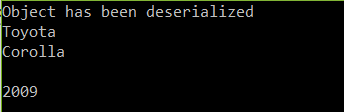
Running this, notice the color is missing:
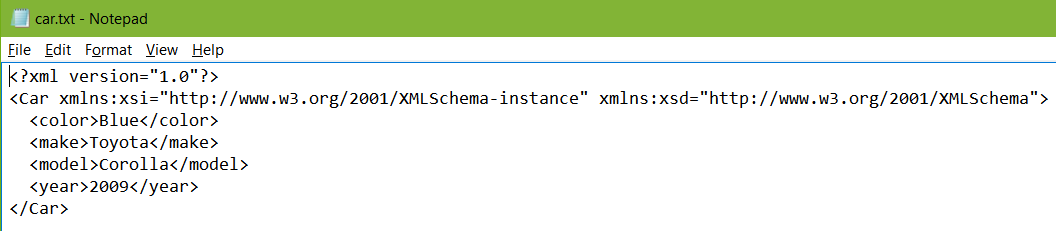
You can also serialize the object to other formats such as XML. To do this:
using System;
using System.Collections.Generic;
using System.Linq;
using System.Text;
using System.Threading.Tasks;
using System.Runtime.Serialization.Formatters.Binary;
using System.IO;

namespace Carl.SerializeConsoleApp
{
    class Program
    {
        static void Main(string[] args)
        {
            Transportation.Car car = new Transportation.Car();
            car.make = "Toyota";
            car.model = "Corolla";
            car.year = 2009;
            car.color = "Blue";


            System.Xml.Serialization.XmlSerializer x = new System.Xml.Serialization.XmlSerializer(car.GetType());
            FileStream fs = new FileStream("car.txt", FileMode.Create, FileAccess.Write, FileShare.None);
            try
            {
                using (fs)
                {
                    x.Serialize(fs, car);
                    Console.WriteLine("Object has been serialized.");

                }
                Console.ReadLine();
            }
            catch(Exception ex)
            {
                Console.WriteLine("An error has occurred: " + ex.ToString());
            }
        }
    }
}
Which produces:

Explore AI, agents & Microsoft technology.
I share practical ideas, tutorials, and videos about AI, AI agents, Microsoft technologies, and the Power Platform.
Subscribe on YouTube →