LINQ, or Language Integrated Query, is a query language in the .NET Framework. LINQ is useful in that you could have several different data sources you are working with within Visual Studio, and LINQ provides a way to query data uniformly. Examples include SQL, Objects, ADO.NET, Entity Framework etc.
Here we will go through examples of using LINQ.
Firstly, to use LINQ, you add the namespace:
using System.Linq;
Let’s say we have a list of Customers:
            Customer customer1 = new Customer();
            customer1.FirstName = "Bob";
            customer1.LastName = "Smith";
            customer1.PhoneNumber = "111-222-3344";

            Customer customer2 = new Customer();
            customer2.FirstName = "James";
            customer2.LastName = "Smith";
            customer2.PhoneNumber = "111-222-3355";

            Customer customer3 = new Customer();
            customer3.FirstName = "David";
            customer3.LastName = "Smith";
            customer3.PhoneNumber = "111-222-3377";

            List l = new List();
            l.Add(customer1);
            l.Add(customer2);
            l.Add(customer3);
Using LINQ, we can easily find out several pieces of information, such as getting the phone number of a particular customer, returning a list of all customers that meet a certain condition, etc.
Lambda expressions are anonymous functions that are used to create delegates in LINQ. An example of a lambda expression is x => x == 1, where the => operator separates the variables from the body. In the code below, you can see how we can use Lambda expressions with LINQ to filter and retrieve information:
            // Find Bob's phone number
            string BobPhoneNumber = l.First(s => s.FirstName == "Bob").PhoneNumber;
            Console.WriteLine(BobPhoneNumber);

            // Return customer Bob
            Customer Bob = l.First(s => s.FirstName == "Bob");
            string BobLastName = Bob.LastName;
            Console.WriteLine(BobLastName);

            // Or using var
            var David = l.First(s => s.FirstName == "David");
            string DavidLastName = David.LastName;
            Console.WriteLine(DavidLastName);

            // Return all smiths
            IEnumerable Smiths = l.Where(c => c.LastName == "Smith");
            foreach (Customer Smith in Smiths)
            {
                Console.WriteLine("Smith's first name: {0}", Smith.FirstName);
            }

            // Return count
            int count = (from customer in l
                         where customer.LastName == "Smith"
                         select customer).Count();
            Console.WriteLine("Count: {0}", count);
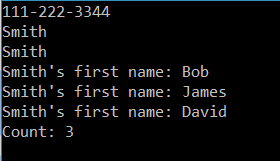
This produces:
The main purpose of a Lambda expression is to simplify the amount of code written.
Consider our above example. Let’s say we wrote an anonymous method that returned the customers with a first name of “James”. It would look something like:
 IEnumerable<Customer> James = l.Where(delegate (Customer c)
 {
 return c.FirstName == "James";
 });
Which produces:

Or, we could write the lambda expression as more simply:
IEnumerable<Customer> James = l.Where(c => c.FirstName == "James");

Explore AI, agents & Microsoft technology.
I share practical ideas, tutorials, and videos about AI, AI agents, Microsoft technologies, and the Power Platform.
Subscribe on YouTube →