In JavaScript, there are different ways to define properties to objects.
For example, if we have a Customer class, we can define properties using the this keyword, and also Object.defineproperty:
function Customer (firstname, lastname, email, phonenumber) {
    this.firstname = firstname,
    this.lastname = lastname,
    this.email = email,
    Object.defineProperty(this, "phonenumber", {
        writable: true,
        enumerable: true,
        configurable: false,
        value: phonenumber
    });
}

//Print out Customer
var Customer00001 = new Customer("Bob", "Smith", "bob@test.com", "111-222-7777")
console.log(Customer00001);
Running this produces:
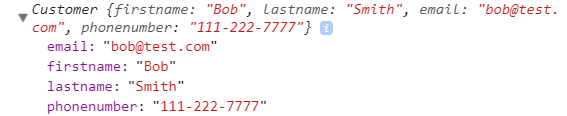
With Object.defineProperty, we can be more granular with the property, setting:
- writable
- emumerable
- configurable
- value
With writable, consider the code where we update the phone number:
function Customer (firstname, lastname, email, phonenumber) {
    this.firstname = firstname,
    this.lastname = lastname,
    this.email = email,
    Object.defineProperty(this, "phonenumber", {
        writable: true,
        enumerable: true,
        configurable: false,
        value: phonenumber
    });
}

//Print out Customer
var Customer00001 = new Customer("Bob", "Smith", "bob@test.com", "111-222-7777")
Customer00001.phonenumber = "Updated: 222-111-4455";
console.log(Customer00001);
This produces:
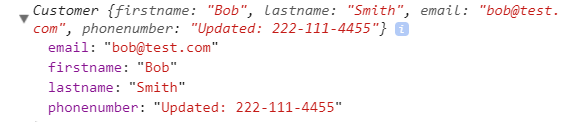
However, with writable: false, the updated phone number would not be written to the object. If we have strict mode turned on, we would see “Uncaught TypeError: Cannot assign to read only property”:

If we set enumerable: false,
function Customer (firstname, lastname, email, phonenumber) {
    this.firstname = firstname,
    this.lastname = lastname,
    this.email = email,
    Object.defineProperty(this, "phonenumber", {
        writable: true,
        enumerable: false,
        configurable: false,
        value: phonenumber
    });
}

//Print out Customer
var Customer00001 = new Customer("Bob", "Smith", "bob@test.com", "111-222-7777")
for (var i in Customer00001)
{
    console.log(Customer00001[i]);
}
This produces below, with the phone number not displayed:

Now with enumerable: false. Let’s say we set this to false, if we try to change another property, we will receive an error “Cannot redefine property”:
function Customer (firstname, lastname, email, phonenumber) {
    this.firstname = firstname,
    this.lastname = lastname,
    this.email = email,
    Object.defineProperty(this, "phonenumber", {
        writable: true,
        enumerable: true,
        configurable: false,
        value: phonenumber
    });
}

//Print out Customer
var Customer00001 = new Customer("Bob", "Smith", "bob@test.com", "111-222-7777")
Object.defineProperty(Customer00001, "phonenumber", {enumerable: false});

You can also use Object.defineProperties to define multiple properties at once:
function Customer (firstname, lastname, email, phonenumber, website) {
    this.firstname = firstname,
    this.lastname = lastname,
    this.email = email,
    Object.defineProperties(this, {
        "phonenumber": {
        writable: true,
        enumerable: true,
        configurable: true,
        value: phonenumber
    },
    "website": {
        writable: true,
        enumerable: true,
        configurable: true,
        value: website
    }});
}

//Print out Customer
var Customer00001 = new Customer("Bob", "Smith", "bob@test.com", "111-222-7777", "www.test.com");
console.log(Customer00001);
This displays:

I AM SPENDING MORE TIME THESE DAYS CREATING YOUTUBE VIDEOS TO HELP PEOPLE LEARN THE MICROSOFT POWER PLATFORM.
IF YOU WOULD LIKE TO SEE HOW I BUILD APPS, OR FIND SOMETHING USEFUL READING MY BLOG, I WOULD REALLY APPRECIATE YOU SUBSCRIBING TO MY YOUTUBE CHANNEL.
THANK YOU, AND LET'S KEEP LEARNING TOGETHER.
CARL
