In this post, we will look at configuring the ESLint semi-colon rule.
The ESLint semi rule can be configured so when ESLint runs, it will either require or disallow semi-colons. The JavaScript engine does not specifically need semi-colons in many situations such as at the end of lines. The engine will interpret code without semi-colons provided and know how to deal with it using the automatic semicolon insertion feature, or ASI. There is debate as to whether semi-colons are useful when writing JavaScript code, which is a topic beyond this post.
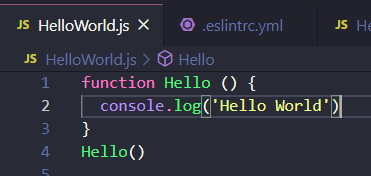
To toggle the semi-colon validation is ESLint, let’s look at a Visual Studio Code project running ESLint. We have a Hello function that does not contain semi-colons on line 2 or 4, for example. ESLint is not complaining – as we can see there are no red lines under the code indicating any problems:
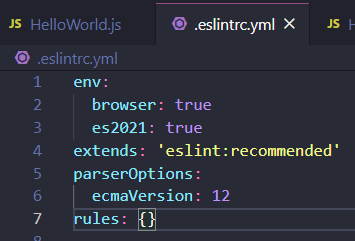
Let’s look at our eslintrc file. In this example we are using YAML, yours may be different:
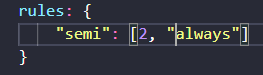
Under rules, let’s add a semi-colon rule:
On saving the eslintrc file, we see we have red lines now on lines 2 and 4:
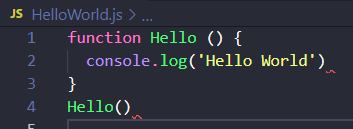
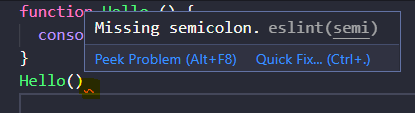
And hovering over it, we see the semi-colon validation message – missing semicolon:
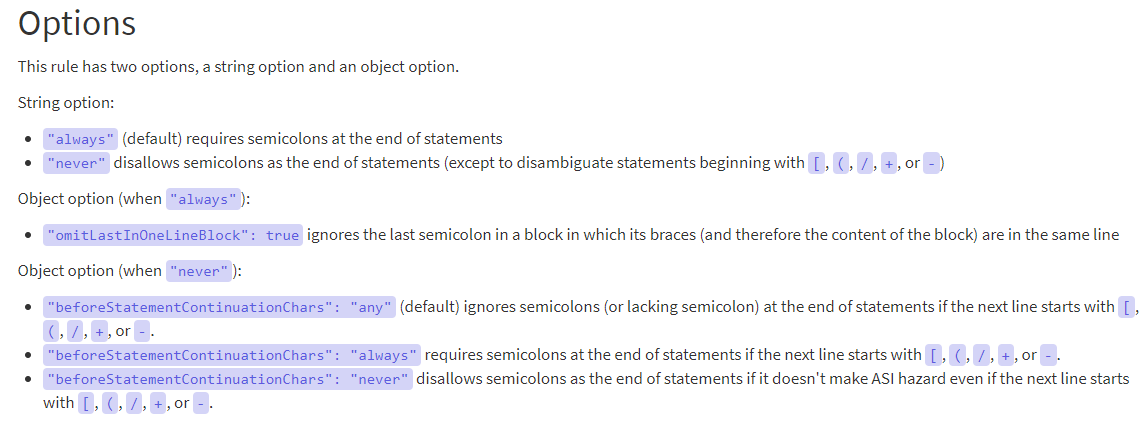
Further options from the ESLint documentation can be found here:

Explore AI, agents & Microsoft technology.
I share practical ideas, tutorials, and videos about AI, AI agents, Microsoft technologies, and the Power Platform.
Subscribe on YouTube →