USD – Stop User from Closing a Tab

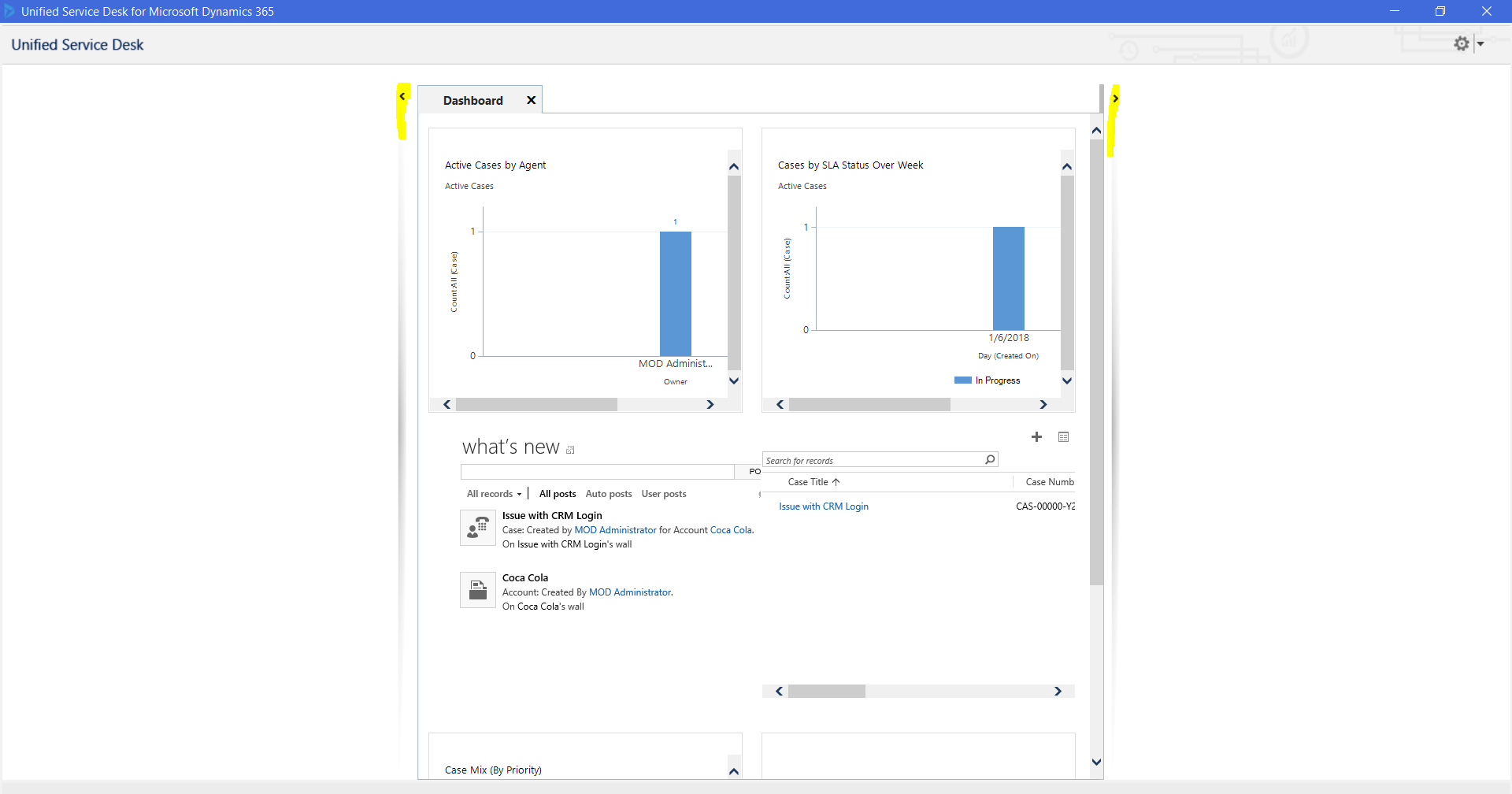
In Unified Service Desk, hosted controls have a property to allow the user to open and close the control. In some cases, you may want to control this so the user does not have this option. Below, I have a hosted control that displays a Dynamics 365 dashboard. You can see there is an X in the hosted control tab, which when clicked on allows the user to close the … Continue reading USD – Stop User from Closing a Tab

Power BI – Union in DAX

In Power BI, through DAX we have the ability to combine 2 tables. We can do this using the UNION function. In Power BI Desktop, select New Table: We have 2 existing tables, East Region Sales and West Region Sales, with the same number of columns. We will combine the two in a Sales table. You will see: Add the code: The combined table shows data from both tables:  

Dynamics CRM Duplicate Detection

Dynamics CRM has built in duplicate detection capabilities to keep your data clean. Let’s look at how these work. Go to Settings->Data Management. You will see several areas for duplicate detection: Let’s start with Duplicate Detection Settings. Click on this: You have the option here to enable duplicate detection: Now click on Duplicate Detection Rules from the main menu. You will see there are several rules already installed: Check the … Continue reading Dynamics CRM Duplicate Detection

Dynamics CRM Goals

Dynamics CRM has the ability to manage goals. This allows managers to review team and individual goals across different timelines. Goals are accessed from the main CRM menu: Here, we opened Goals from the Sales area. If we were in the Service area, or another area, it would still open the same goals. Selecting Goals opens the My Active Goals view: Clicking on Goal for Q1 (Sample) we can see … Continue reading Dynamics CRM Goals

Power BI Dynamics 365 Content Packs Source Code

There are 3 Dynamics 365 content packs for Power BI that Microsoft has provided the PBIX files for download. These files are opened with Power BI Desktop and can be modified and then uploaded to your Power BI environment. To download the PBIX file source code, go to: https://technet.microsoft.com/en-us/library/mt490470.aspx: Select the links to download: From here you will have the source, which you can then customize:  

Dynamics 365 Cases

To create a new case, or issue, in Dynamics 365, go to the Services menu and select Cases: Here, you will see the case, the origin, case number, priority etc: Select a case to open it: Note the Business Process Flow for the case: You may want to create child cases if your case relies on separate departments to complete the main issue. To create a child case, select “Create … Continue reading Dynamics 365 Cases

Dynamics 365 Bulk Delete Jobs

Dynamics 365 has the ability to schedule data for deletion. To do this, go to Settings->Data Management: Select Bulk Record Deletion: Click New and the Bulk Deletion Wizard will appear: Select the entity whose records you want to delete. Enter any additional criteria: If you do not enter any additional criteria you will get this message: Click Next: Note you can schedule when to repeat the job: Click Next and Submit … Continue reading Dynamics 365 Bulk Delete Jobs

Upgrading Unified Service Desk

To upgrade Unified Service Desk, go through the following steps. First, download the latest Unified Service Desk from the Microsoft link: https://www.microsoft.com/en-us/download/details.aspx?id=50355 Check the files and download: Open the executable (non-Package Deployer). Click Next: Keep the options checked and click Install: You will then get this message: Clicking Settings->About and also the login window will show the new version: In Dynamics 365, we see the following solutions and versions for USD: … Continue reading Upgrading Unified Service Desk

Install Power BI Dynamics 365 for Sales Content Pack

To install a Dynamics 365 Content Pack for Power BI, go through the following steps. First, log into powerbi.com. Then, select the Get Data at the bottom of the screen: This will open the page below: Select under Services Get. Search for Dynamics: Select the Microsoft Dynamics 365 Online Sales Manager. Click Get It Now: Enter your Dynamics 365 URL and Fiscal Year End Month Number. Note the trailing / … Continue reading Install Power BI Dynamics 365 for Sales Content Pack

Power BI Service and Importing and Uploading Excel Spreadsheets

Here we will look at how using Excel spreadsheets as datasources works with Power BI. Let’s start with a spreadsheet we have stored locally on our server. The file is called ExcelTransactions.xlsx and is stored locally. It contains rows of data (that have been typed into the spreadsheet and are not external data sources): In PowerBI.com, select Get Data->Files->Get: Select Local File: Select our ExcelTransactions.xlsx file. We will now see this page: Select … Continue reading Power BI Service and Importing and Uploading Excel Spreadsheets