To finding the Dynamics CRM OData and Web API URLs for your organization, go to Dynamics CRM and select Settings->Customizations:

From there, select Developer Resources. You will then see links to the Web API and the OData Organization Service:
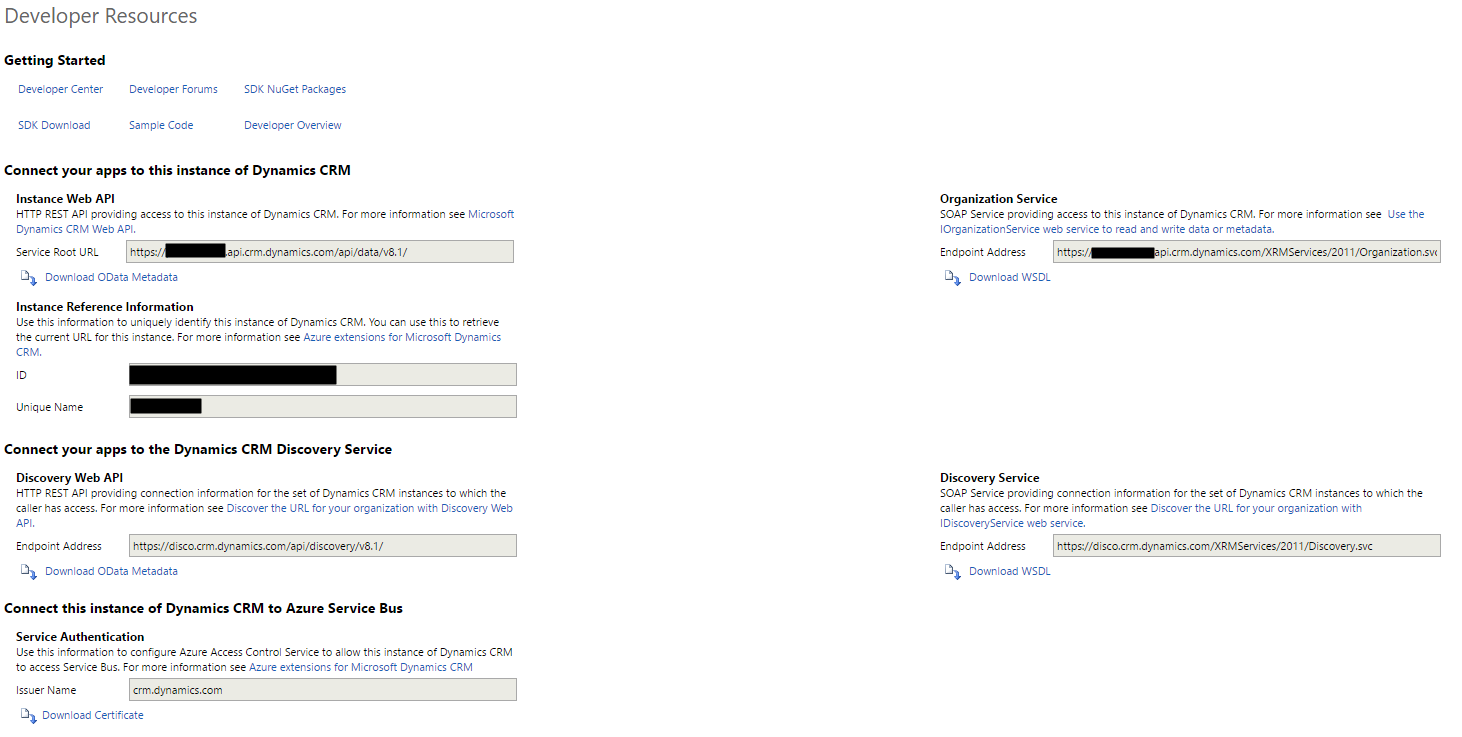
Web API URL: https://orgname.api.crm.dynamics.com/api/data/v8.1/
The service URLs:
- https://orgname.api.crm.dynamics.com/XRMServices/2011/Organization.svc
- https://orgname.crm.dynamics.com/XRMServices/2011/Organization.svc
To get the OData:
- https://orgname.crm.dynamics.com/XRMServices/2011/OrganizationData.svc/
- https://orgname.api.crm.dynamics.com/XRMServices/2011/OrganizationData.svc/

Keep learning. Keep building.
Explore AI, agents & Microsoft technology.
I share practical ideas, tutorials, and videos about AI, AI agents, Microsoft technologies, and the Power Platform.
Subscribe on YouTube →Carl de Souza Enterprise Architect at Microsoft · AI Technology Expert

[…] Selecting the above option, you will get the following dialog box: Please visit the following link to know how to get the above URL – https://carldesouza.com/dynamics-crm-odata-web-api-urls/ […]
How do i connect to these urls? I have the odata/endpoints, how do i connect to these URLS now from POSTMAN or soapui?
Hello
I have a select or optionset field in opportunity.
How to query by optionset or html select filed in dynamics365?