JavaScript contains different ways to handle errors.
One way is using try/catch/finally. In the example below, variable y does not exist.
try
{
    var x = 1 + y;
    console.log(t);
}
catch(e)
{
    console.log("Error: " + e);
}
finally
{
    console.log("Run finally");
}
Running this produces:
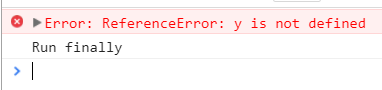
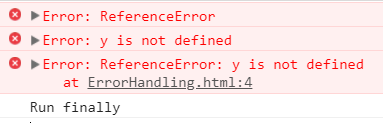
Note you can also use name, message and stack to get error information:
try
{
    var x = 1 + y;
    console.log(t);
}
catch(e)
{
    console.error("Error: " + e.name);
    console.error("Error: " + e.message);
    console.error("Error: " + e.stack);
}
finally
{
    console.log("Run finally");
}
You can also throw exceptions using throw:
try
{
    throw 'This is an exception';
}
catch(e)
{
    console.error("Error: " + e);
}
finally
{
    console.log("Run finally");
}
This produces:
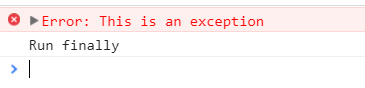

Keep learning. Keep building.
Explore AI, agents & Microsoft technology.
I share practical ideas, tutorials, and videos about AI, AI agents, Microsoft technologies, and the Power Platform.
Subscribe on YouTube →Carl de Souza Enterprise Architect at Microsoft · AI Technology Expert
