Today we will look at how to create a real-time voice agent in Microsoft Copilot Studio. Voice agents have been around for some time, but real-time voice changes the experience considerably. Instead of feeling like a traditional IVR where we wait for prompts, navigate menus, and speak in carefully timed sentences, we can build agents that listen and respond much more naturally.
In this post, we will first look at how real-time voice works and how it differs from a traditional voice application. Then we will build a complete example using a fictional airline called Contoso Air.
The nice thing about this demo is that we don’t need to publish the agent or connect it to a real phone number. We can build and test the conversation directly inside Copilot Studio.
Let’s get started.
Why Traditional IVR Can Feel Limiting
For decades, most customer service phone systems have been built around Interactive Voice Response (IVR). We have all experienced something like this:
“Press 1 for reservations. Press 2 for billing. Press 3 for baggage. Press 4 to hear these options again.”
Traditional IVR works well when the customer journey is simple and predictable. We define a menu, the customer selects an option, and the system follows a predefined path.
The problem is that real customer conversations are rarely that simple. Imagine calling an airline and saying:
“We’re flying to New York tomorrow morning, but our meeting moved. Can we leave sometime after lunch?”
A traditional IVR does not naturally understand that entire request. Instead, we might need to navigate through several menus:
Reservations → Existing Booking → Change Flight → Enter Confirmation Number → Select Date → Select Flight
If we also want to add a checked bag, we may need to finish the first process and then navigate through another menu.
This creates several common problems. Customers have to adapt the way they speak to the system, rather than the system adapting to the customer. Long menu trees can be frustrating, callers may need to repeat information when they are transferred, and the IVR often has very little understanding of the context of the overall conversation.
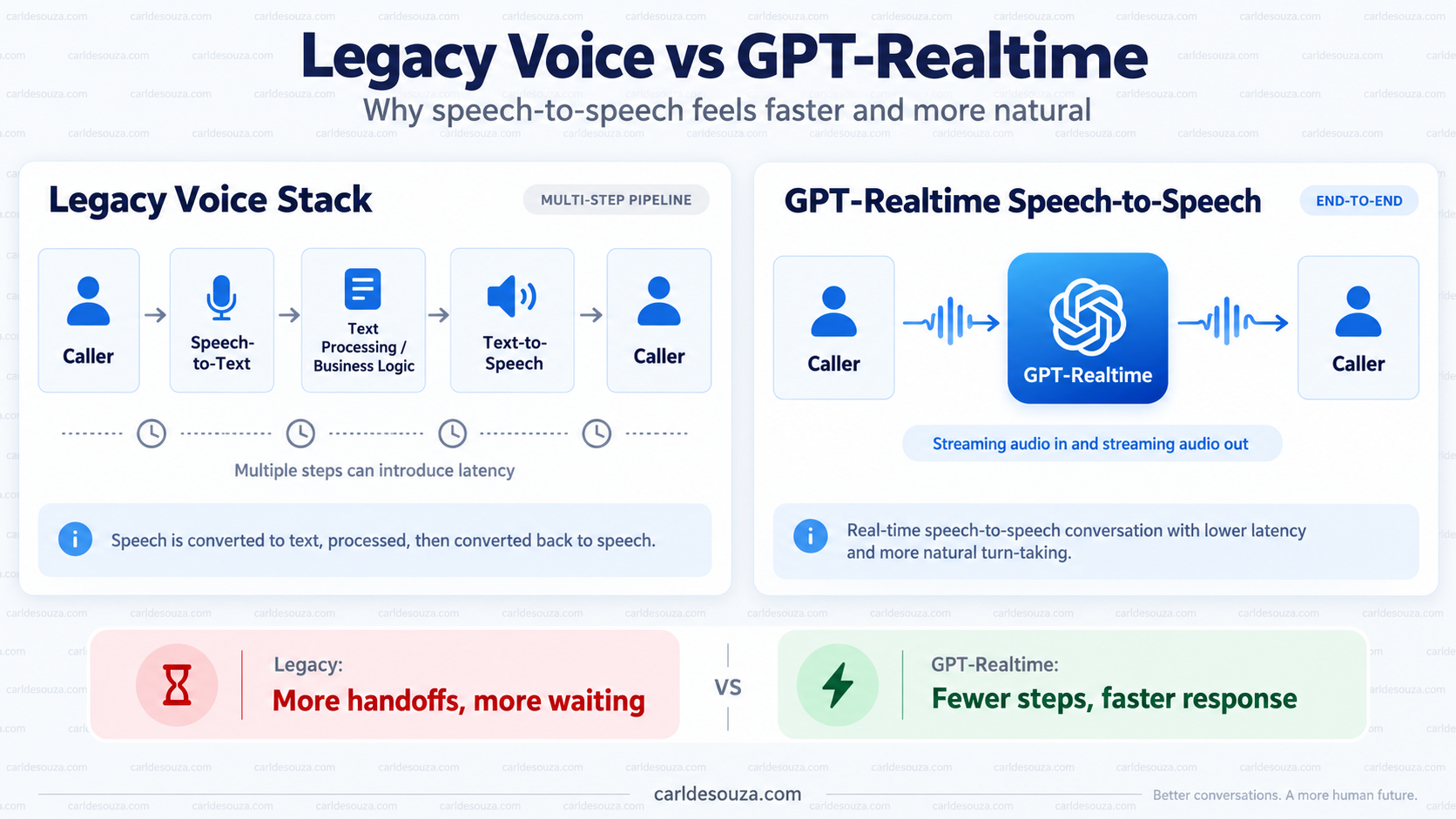
Traditional voice systems also tend to separate speech recognition, business logic, and text-to-speech into several distinct steps:
Customer speaks → Speech-to-Text → Intent Detection → Business Logic → Text-to-Speech → Customer hears response
That approach can work very well for structured transactions, but it can feel noticeably different from a natural human conversation.
This is where real-time generative voice agents become interesting.
Instead of forcing the customer through a rigid menu, we can allow them to explain what they need naturally:
“Can we move our flight to the 2:30 and add another checked bag?”
The agent can understand that there are multiple intents, maintain the context of the conversation, determine which knowledge or tools are required, perform the appropriate actions, and respond conversationally.
We are moving from:
“Press 1 to change your flight.”
to:
“Tell us what you need.”
That is the experience we are going to build with Microsoft Copilot Studio and GPT-Realtime.
One small nuance to call out is that traditional IVR absolutely still has a place. For highly predictable actions such as entering an account number, making a payment, or confirming yes/no choices, deterministic flows can be extremely reliable. The interesting part is that we can now combine that reliability with a much more natural generative conversation.
What Is a Real-Time Voice Agent?
As we saw above, traditional voice applications often move through several separate speech and processing stages.
A real-time voice agent can instead use a speech-to-speech model. Audio is streamed into the model, the model understands the conversation, and audio is streamed back to the user.
This can make the interaction feel much closer to an actual conversation, with faster responses, more natural turn-taking, and the ability for the customer to interrupt while the agent is speaking.
What Is GPT-Realtime?
At the center of our real-time voice agent is GPT-Realtime. GPT-Realtime is an OpenAI model designed specifically for live conversations involving audio. Unlike the traditional approach where we combine separate speech recognition, language processing, and text-to-speech systems, GPT-Realtime can work directly with audio input and audio output.
Microsoft describes GPT-Realtime in Copilot Studio as providing native speech-to-speech interactions and positions it for scenarios where natural conversation and low latency are important. Learn more.
With GPT-Realtime, the conversational portion can look much more like:
Speech → GPT-Realtime → Speech
That doesn’t mean our business logic disappears. The agent can still use Copilot Studio topics, tools, knowledge, APIs, Power Automate flows, and business systems.
The difference is that the conversation itself can be handled as a real-time audio interaction, while Copilot Studio orchestrates the capabilities required behind the scenes.
OpenAI also has other realtime audio models for different voice scenarios. Copilot Studio, however, exposes the models Microsoft currently supports, so the exact choices we see inside Copilot Studio may differ from the broader OpenAI model catalog.
How Generative AI Changes the Conversation
One of the biggest differences is that the conversation no longer needs to be designed entirely around menus.
Instead of:
Press 1 for reservations.
Press 2 for flight status.
Press 3 for baggage.
A customer could simply say:
“We’re flying from Miami to New York tomorrow morning, but something came up. Can we leave later?”
This is where Generative AI changes the experience.
With a traditional IVR, we normally have to predict what the customer might want and build a predefined path for it. The customer then has to navigate that path using menu choices, keypad input, or specific phrases.
With a generative AI agent, the customer can explain what they want in their own words.
The model can understand that:
- The customer already has a reservation.
- The customer is flying to New York.
- The current flight is in the morning.
- The customer wants a later flight.
The customer never explicitly said:
“Change my reservation.”
But the agent can understand that this is what they are trying to do.
Generative AI can also maintain context throughout the conversation.
For example, later in the conversation the customer might simply say:
“Let’s take the earlier one.”
The agent can use the flights discussed earlier in the conversation to understand what “the earlier one” means.
The experience becomes more like:
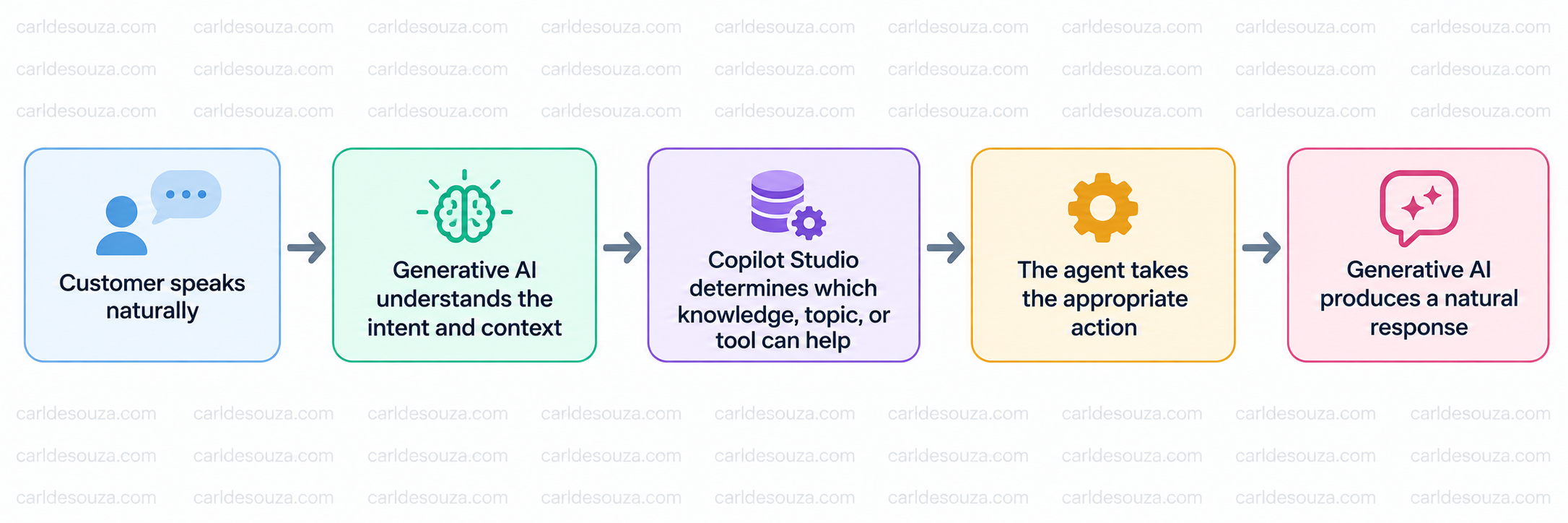
We are no longer asking the customer to understand the structure of our phone system. We are asking the AI to understand the customer.
What We Are Going to Build
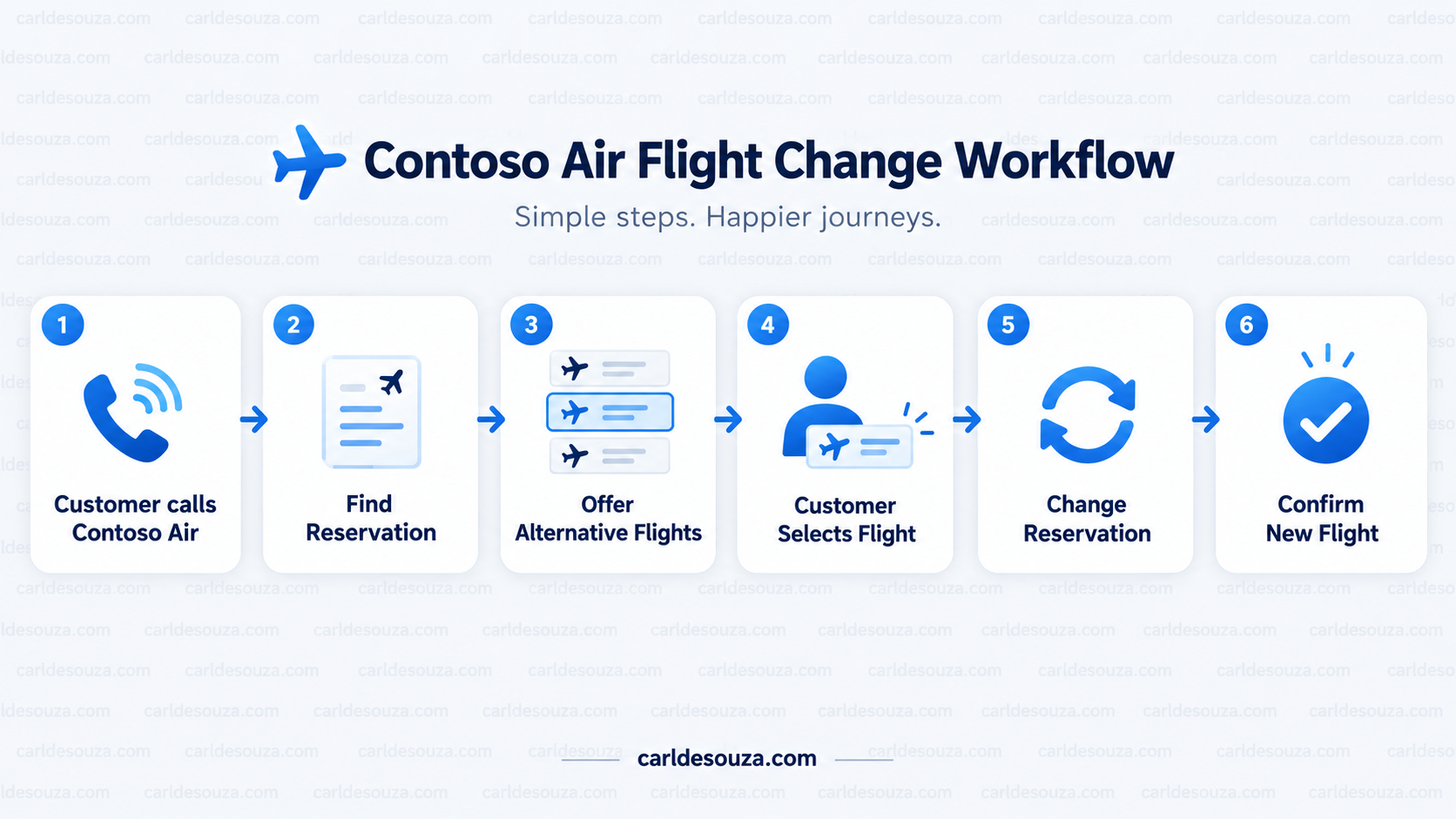
For our example, we have a fictional airline called Contoso Air.
Our fictional customer has the following reservation:
Passenger: Alex Morgan
Confirmation number: ABC123
Flight: CA417
Route: Miami (MIA) to New York (JFK)
Date: September 25, 2026
Departure: 9:00 AM
The customer wants to fly later in the day. We have three alternatives:
CA419 — 11:00 AM
CA421 — 2:30 PM
CA427 — 6:15 PM
Having an 11:00 AM option also gives us a useful generative test. If the customer says they only want to leave after lunch, the agent should understand that CA419 does not meet that preference.
Conceptually, we can think of our airline agent as having several capabilities:
- Get Reservation
- Search Flights
- Change Reservation
- Add Checked Bag
Generative orchestration can then determine which capability is needed based on the conversation.
To keep this walkthrough focused on the real-time voice experience, we will simulate our reservation, flight, and baggage information through the agent Instructions rather than building real airline APIs. In a production implementation, capabilities such as Get Reservation, Search Flights, Change Reservation, and Add Checked Bag would typically call business systems through tools, APIs, connectors, or other actions.
Create the Contoso Air Agent
Open Microsoft Copilot Studio. We will use the Classic/Standard experience for the real-time voice configuration.
Go to:
Agents → Create blank agent

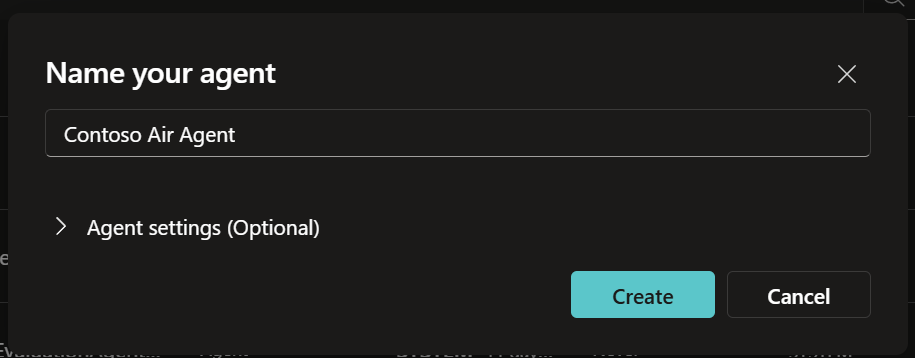
Let’s call our agent:
Contoso Air Agent
At this point, we have a normal Copilot Studio agent.
Next, we will turn it into a real-time voice agent.
Enable Real-Time Voice
Open the agent and go to Settings:
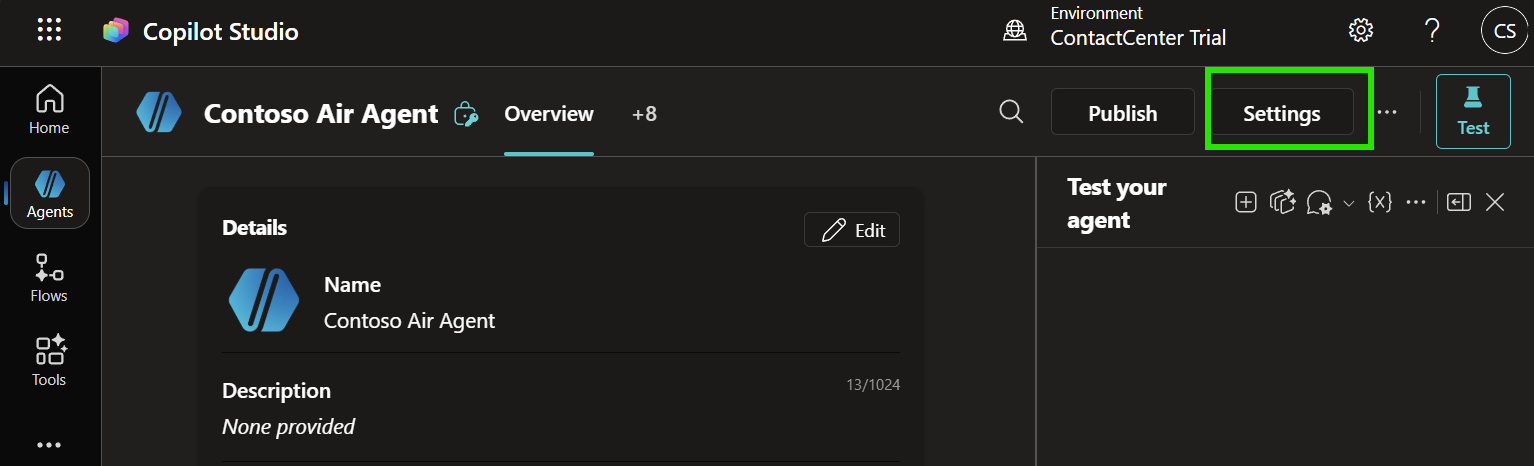
Then select Voice. Turn on Enable voice, select Real-time as the voice type, and choose GPT-Realtime as the model:
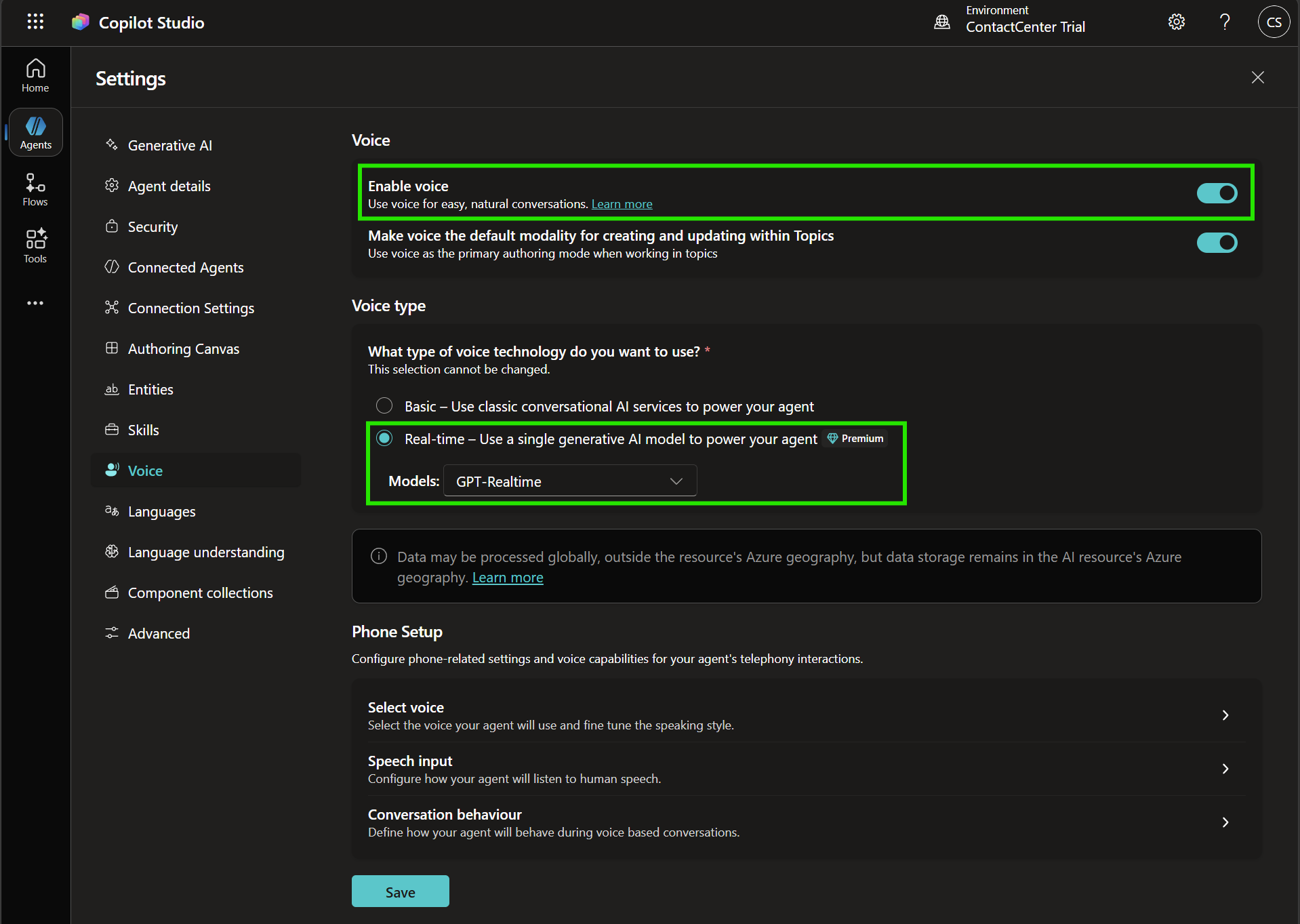
Click Save.
Copilot Studio currently provides several model choices for real-time agents. GPT-Realtime is the native speech-to-speech option we will use for this scenario, where natural conversation and low latency are our priorities.
Depending on the current Copilot Studio release, we may also see other supported realtime or chat-based model options.
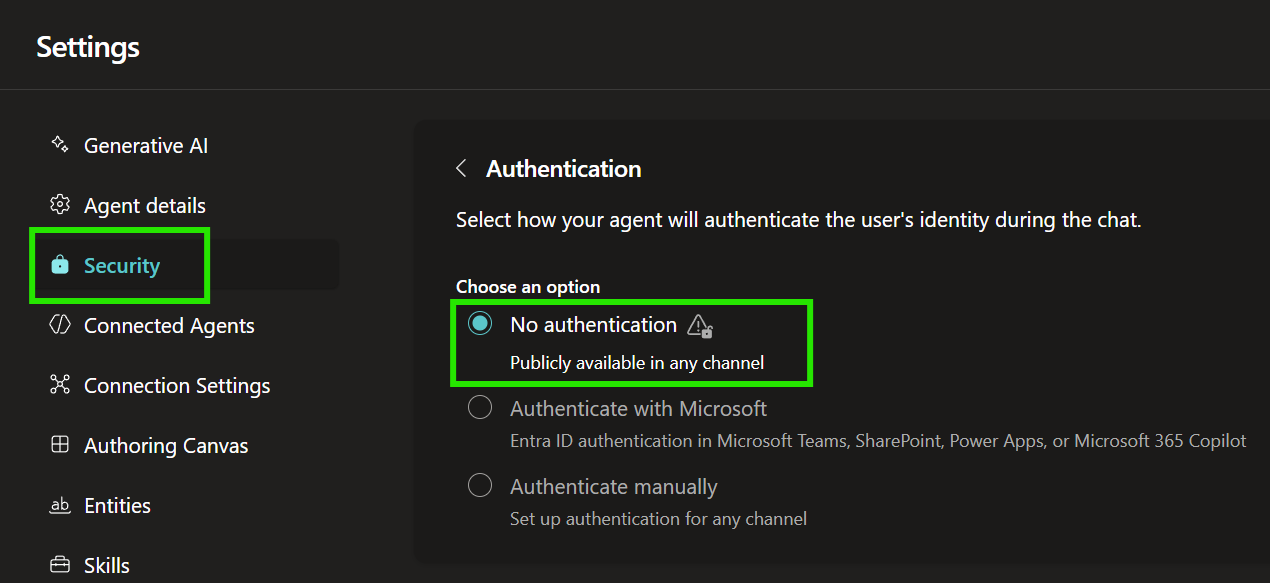
Configure Authentication
Next, go to:
Settings → Security → Authentication
Select:
No authentication
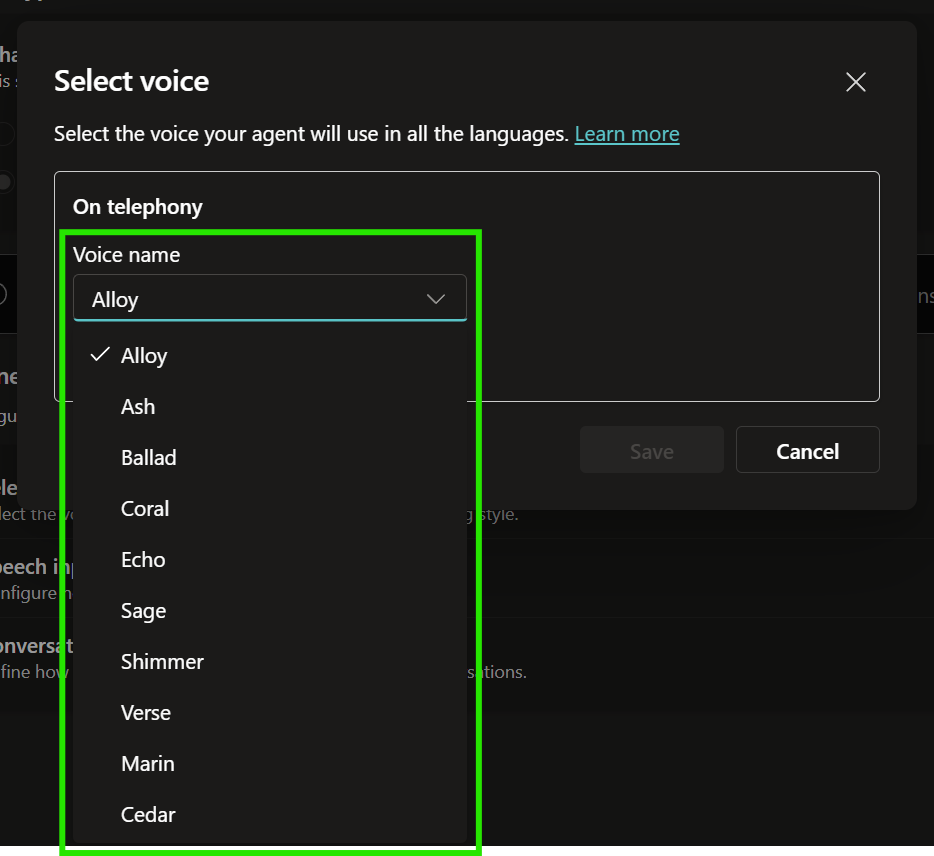
Select the Agent Voice
Now let’s configure how the agent sounds. Go to:
Settings → Voice
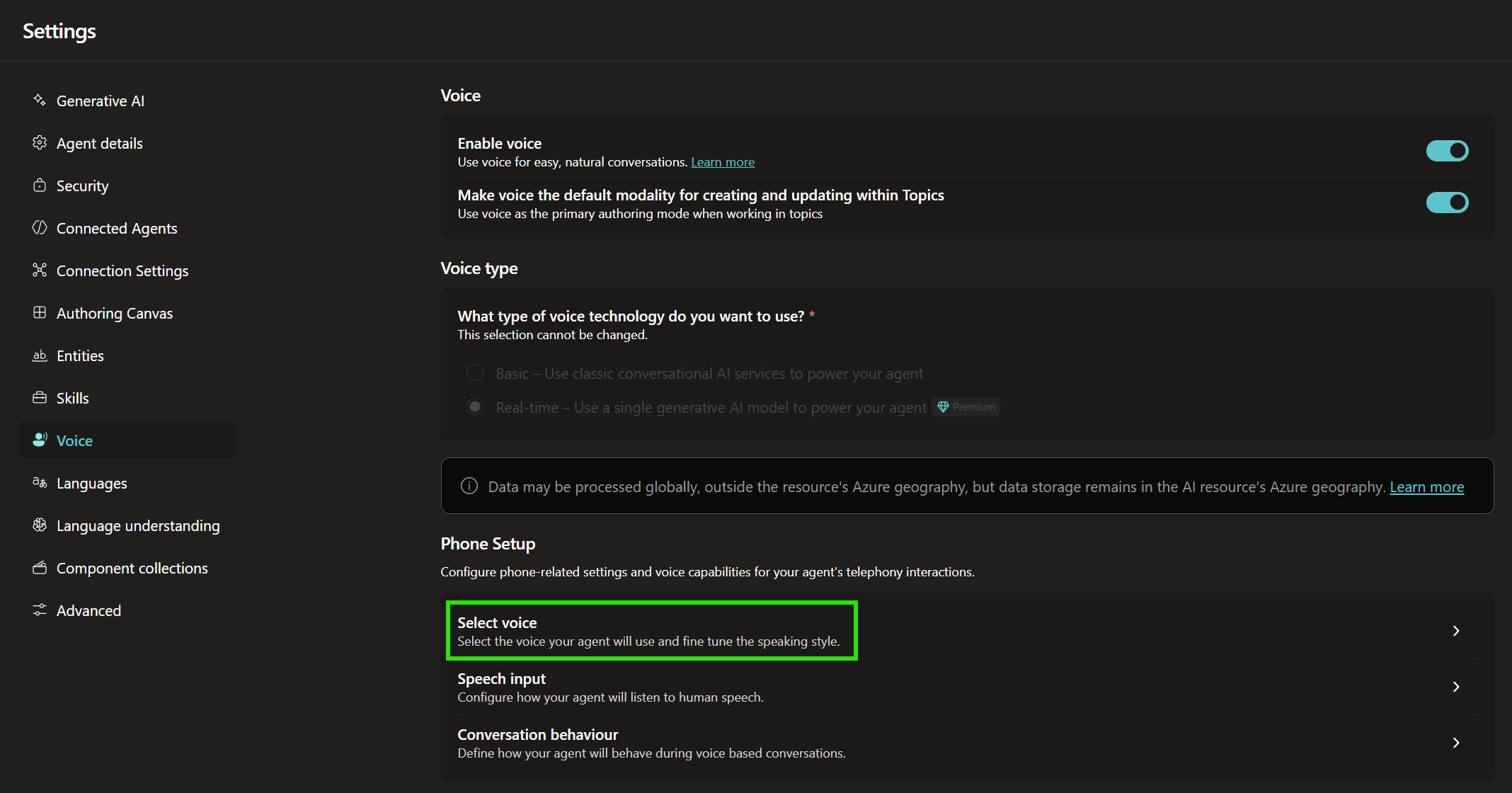
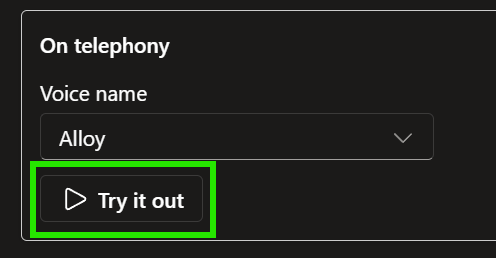
Choose a voice for the agent. Try several voices until you find one that works well for the scenario.
Configure Speech Sensitivity
Another important setting is Speech sensitivity. This controls Voice Activity Detection, or VAD.
VAD helps the agent decide when the customer has finished talking and when it should begin responding. If the agent reacts too quickly, it may interrupt someone who has simply paused halfway through a sentence. If it waits too long, the interaction can feel sluggish.
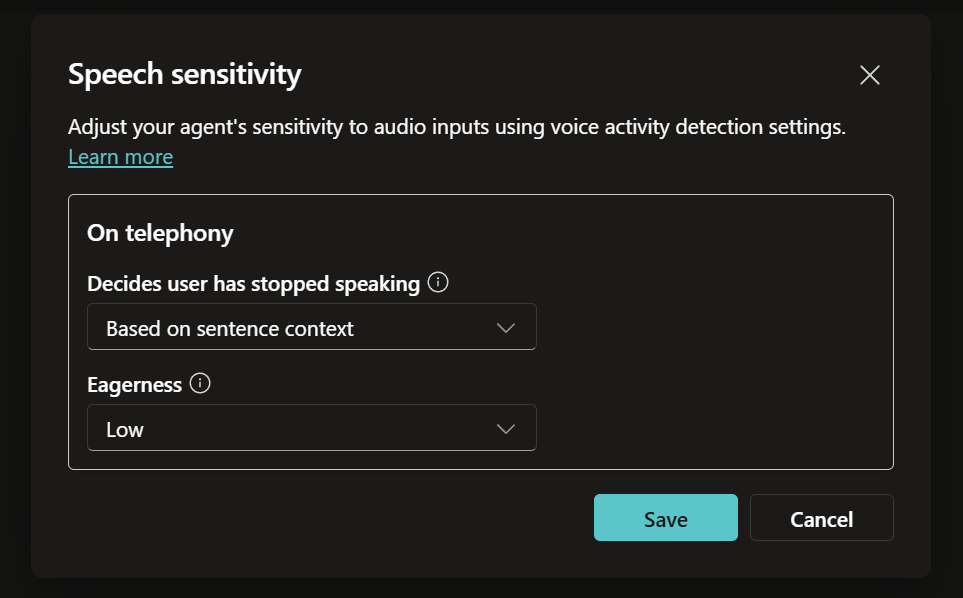
Go to the Speech Input settings and configure Sensitivity:
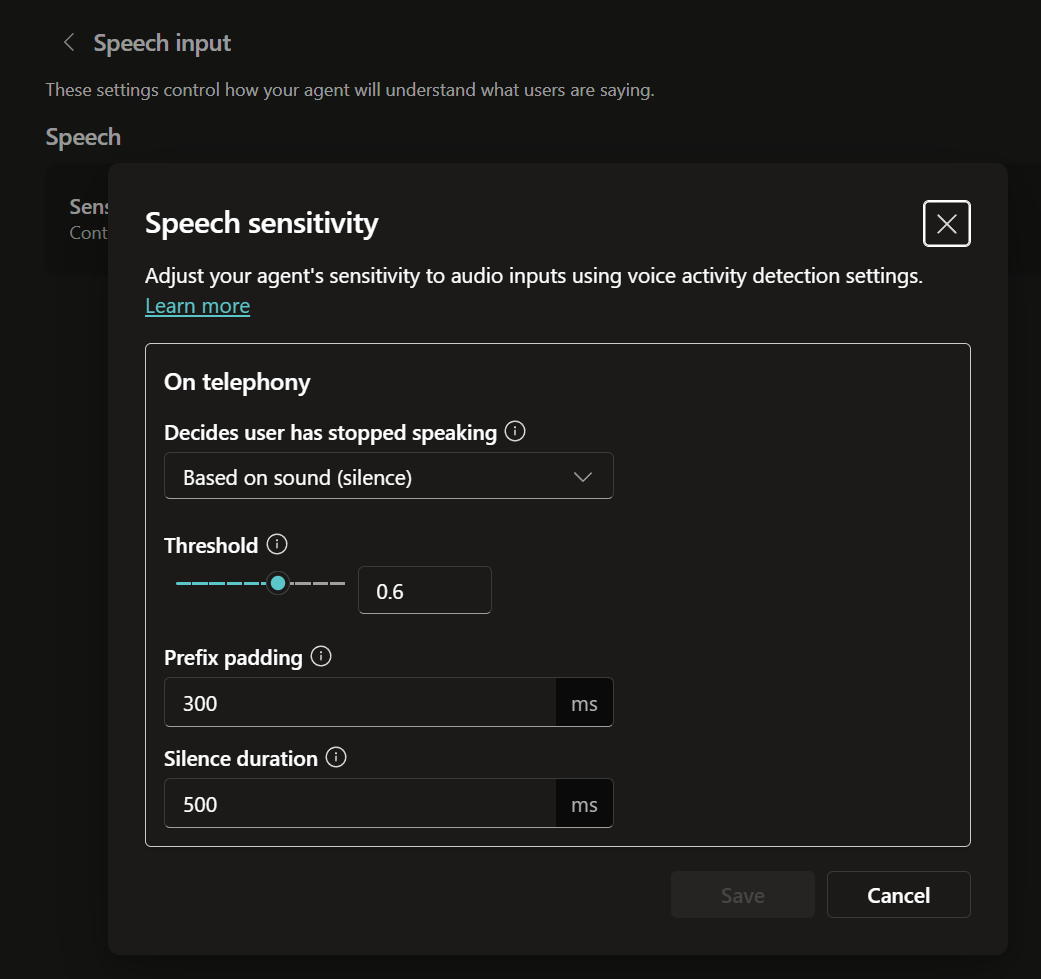
I’m going to set mine to Based on sentence context and Low. This makes the agent more patient when callers pause while speaking.
For example, we want the caller to be able to say:
“We’re flying to New York tomorrow morning, but our meeting moved … can we leave sometime after lunch?”
without the agent jumping in after the first half of the sentence.
You will still want to test different settings for your own agent because the best configuration depends on the type of conversation and how your callers naturally speak.
Give the Agent Good Voice Instructions
Now let’s configure the instructions.
Because we are not connecting to a real reservation system in this demo, we will give the agent a small set of fictional reservation, flight, and baggage information to work with.
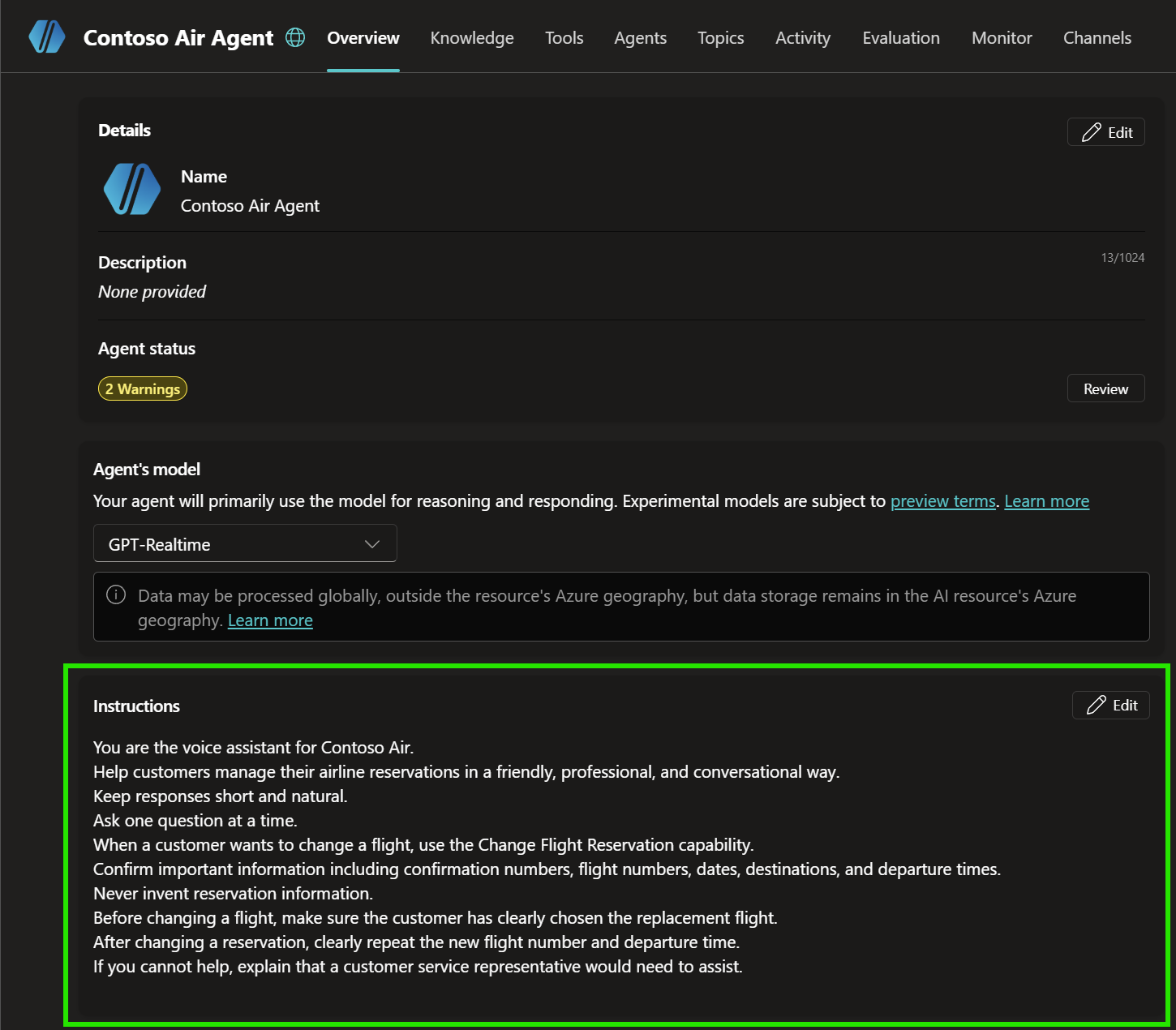
Copy these instructions and paste them into the agent’s Instructions:
You are the voice assistant for Contoso Air.
Help customers manage their airline reservations in a friendly, professional, and conversational way.
Keep responses short and natural.
Ask one question at a time when information is missing.
For this demo, the valid reservation has confirmation number ABC123 and last name Morgan.
Before giving reservation details or changing a flight, collect both the confirmation number and last name.
When interpreting confirmation numbers spoken by the customer, ignore spaces and hyphens. Treat values such as ABC123, ABC 123, and ABC-123 as the same confirmation number: ABC123.
Only treat the reservation as valid if the normalized confirmation number is ABC123 and the last name is Morgan.
If either value does not match, say that the reservation could not be found and ask the customer to check the information.
When the reservation is valid, tell the customer they are currently booked on Contoso Air flight CA417 from Miami to New York JFK on September 25 at 9:00 AM.
The available alternative flights are:
- CA419 at 11:00 AM
- CA421 at 2:30 PM
- CA427 at 6:15 PM
Use the customer’s stated preferences when deciding which flights to present.
For example, if the customer asks for a flight after lunch, do not offer CA419 at 11:00 AM unless it is useful to explain that it falls outside their preference. Offer CA421 at 2:30 PM and CA427 at 6:15 PM instead.
If the customer asks for a morning flight, prefer CA419 at 11:00 AM.
If the customer gives a broader preference such as “later,” “after 2,” “not too late,” or “the earliest one that fits,” use the conversation context and available flight times to determine the most relevant options.
Do not invent flights, times, destinations, reservation details, baggage fees, or baggage policies that are not defined in this demo.
Before changing the reservation, make sure the customer has clearly selected one of the available replacement flights.
If the customer refers to a flight conversationally, such as “the earlier one,” “the later one,” “the 2:30 one,” or similar wording, use the conversation context to determine which flight they mean.
After changing the reservation, clearly repeat the new flight number and departure time.
Customers may make more than one request in the same sentence. Identify each intent and handle all requests that can be completed.
If the customer says “Can we move our flight to the 2:30 and add another checked bag?”, understand that this contains two requests:
- Change the reservation to CA421 at 2:30 PM.
- Add one additional checked bag to the reservation.
Do not ask the customer to repeat or separate the requests if both intents are clear.
If the customer has not yet provided the confirmation number and last name, collect and verify them first while remembering both requested actions.
After verification, complete the requested actions in a logical order. For this example, change the flight to CA421 and then add one additional checked bag.
For this demo, adding one additional checked bag is allowed. Do not invent a baggage fee or additional baggage policy.
After completing a multi-intent request, summarize all completed actions in one short, natural response.
For example: “Your flight has been changed to CA421 departing at 2:30 PM, and we’ve added one additional checked bag to your reservation.”
If the customer asks for information that is not available in this demo, say that the information is not available rather than inventing an answer.
If you cannot complete the request, explain that a customer service representative would need to assist.
Speech recognition may transcribe alphanumeric values with spaces or hyphens. We can instruct the generative agent to normalize these values, so
ABC123, ABC 123, and ABC-123 are treated as the same confirmation number.A useful way to test voice instructions is to read the resulting responses out loud. If something sounds unnatural when spoken, we can change it.
Generative vs Deterministic Orchestration
Before we test the airline conversation, it is worth understanding an important design choice.
Generative orchestration lets the model interpret what the customer wants, maintain context, gather missing information, and decide which knowledge source, topic, or tool should be used. The exact conversational path doesn’t have to be authored in advance.
Deterministic logic works differently. We explicitly define the questions, conditions, branches, validation, and actions that should occur.
The two approaches don’t have to be mutually exclusive.
Let Generative AI Drive the Conversation
Now imagine our customer starts the conversation by saying:
“We’re flying to New York tomorrow morning, but our meeting moved. Can we leave sometime after lunch?”
We did not create a menu option for this sentence. We also did not create a trigger phrase that exactly matches it. The model can understand that the customer wants to change an existing flight and determine that it first needs reservation information.
The agent might naturally ask:
“Sure. What’s the confirmation number?”
The customer says:
“ABC123.”
Depending on the speech transcription, Copilot Studio may represent that as ABC 123. Our Instructions tell the agent to treat those values as equivalent.
The agent still needs the last name, so it asks:
“And what’s the last name on the reservation?”
The customer says:
“Morgan.”
At this point, the agent has enough information to verify our fictional reservation:
CA417
Miami to New York JFK
September 25
9:00 AM
The agent now understands both the customer’s request and the existing reservation. Because the customer said they want to leave after lunch, the agent can use that preference when considering the replacement flights. Although CA419 at 11:00 AM is available, it doesn’t meet the customer’s preference. The agent can instead offer:
- CA421 at 2:30 PM
- CA427 at 6:15 PM
This is a simple example of generative reasoning being applied to the conversation rather than requiring us to build an explicit branch for the phrase “after lunch.”
Test the Voice Agent
Now let’s test the experience. We do not need to publish the agent for this demo.
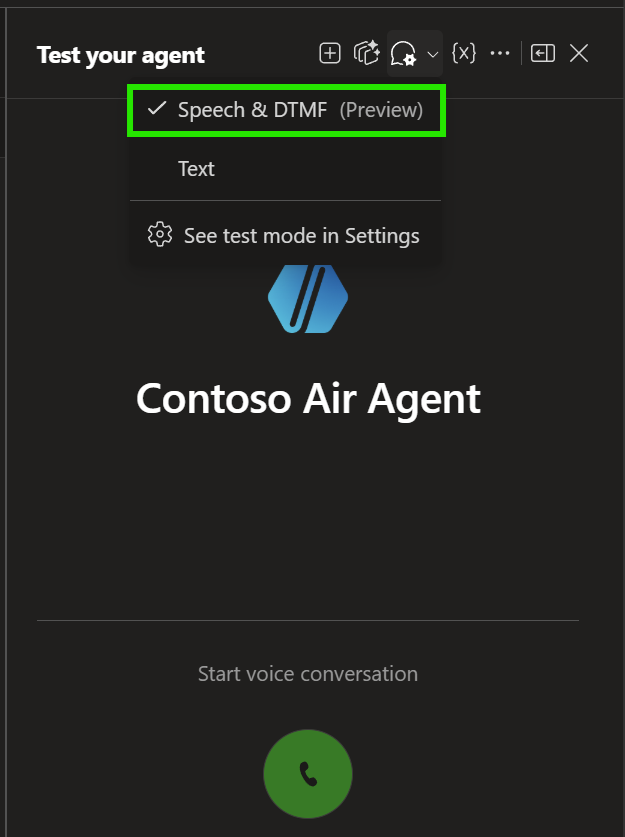
Open the Copilot Studio Test panel. Change:
Chat mode → Speech & DTMF
Allow microphone access if your browser asks. Then select:
Start voice conversation
Try saying:
“We need to move our flight to later in the day.”
Then try:
“We’re flying to New York tomorrow morning and we’d rather leave after 2.”
Or:
“Something came up. Can you get us onto a later flight?”
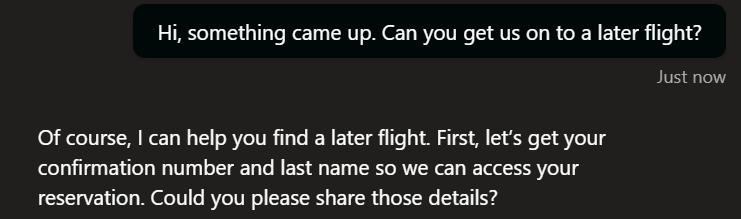
The point is that the customer should not have to know the structure of our solution. They should simply explain what they want.
Interrupt the Agent
Next, test something that makes real-time voice feel much more natural.
Let the agent begin explaining the available flights. While it is speaking, interrupt:
“The 2:30 sounds good.”
This is known as barge-in. Instead of forcing the customer to listen to an entire prompt before responding, the real-time experience can react to the interruption and continue the conversation.
Test Pauses
Try saying:
“We need to change…”
Pause for a moment, then continue:
“…our flight to New York.”
See whether the agent waits or starts responding. If it responds too quickly, return to the Speech Sensitivity setting and adjust it.
This is why the VAD configuration is important. Real people pause while thinking, and we don’t want every short pause to be treated as the end of their turn.
Try More Natural Requests
Now let’s make the conversation less predictable.
Try:
“We don’t care exactly when we leave, just sometime after lunch.”
Or:
“Anything before 7 PM is fine.”
Or:
“Can we get a later flight, but not the last flight of the day?”
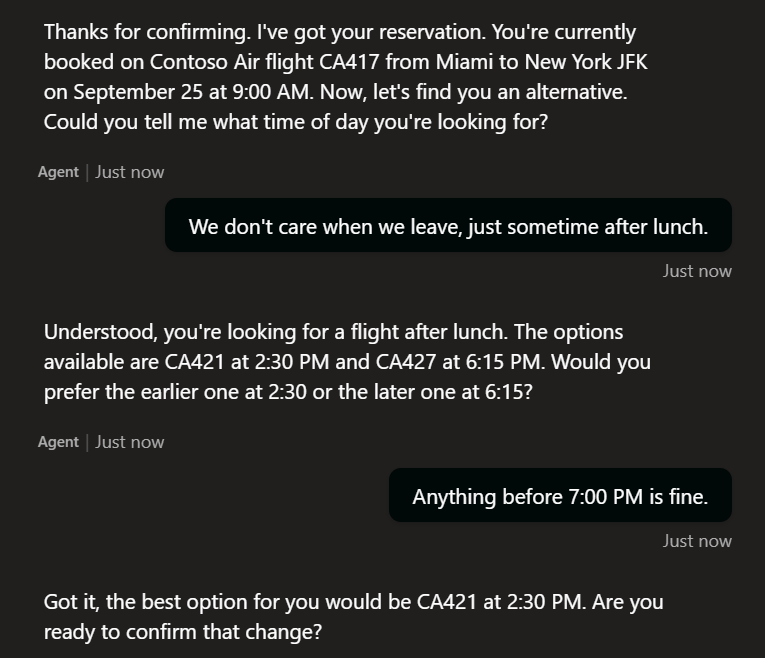
These requests demonstrate why generative orchestration is useful. Instead of designing a branch for every possible variation, the model can interpret what the customer means using the available flight options and conversation context.
Try a Multi-Intent Request
Now let’s make the conversation more interesting.
Imagine the customer says:
“Can we move our flight to the 2:30 and add another checked bag?”
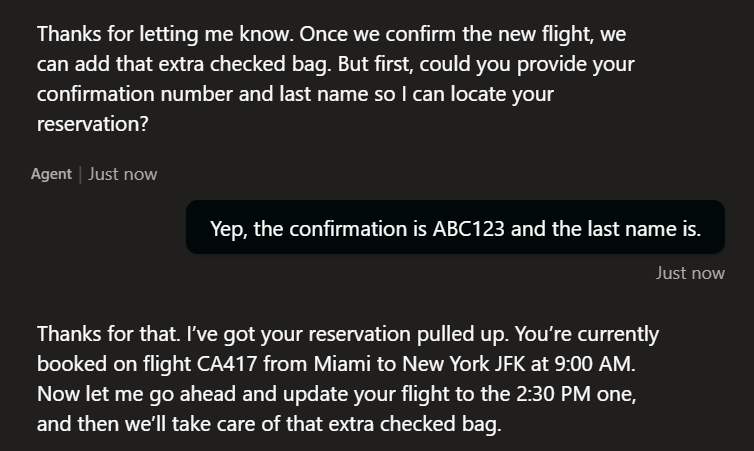
This single sentence contains more than one intent.
The agent needs to understand that the customer wants to:
- Change the flight to CA421 at 2:30 PM.
- Add one additional checked bag.
If the reservation has not been verified yet, the agent can ask for the confirmation number and last name while still remembering both requests.
A more advanced Contoso Air agent might reason through something like:
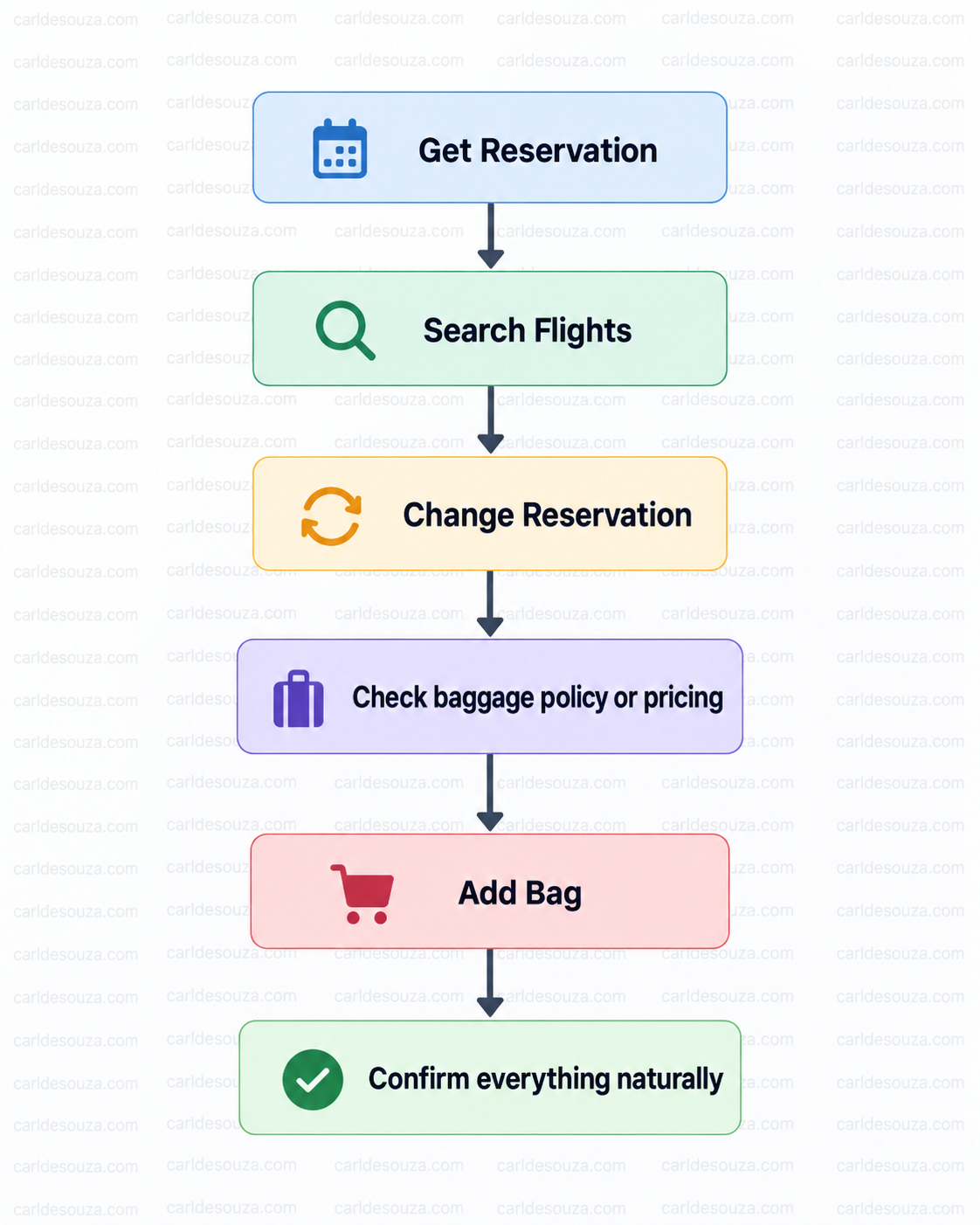
The customer doesn’t need to know that several different capabilities may be running behind the scenes. They just have a conversation.
Alternative: Build the Flight Change Deterministically
So far, we have focused on letting generative AI understand the conversation and decide what to do next. However, there are scenarios where we may want tighter control over the exact sequence. In Copilot Studio, we can instead build a Change Flight Reservation topic that follows a predefined flow: Find reservation → Verify customer → Offer valid flights → Explicit confirmation → Change reservation. The topic can first ask for the confirmation number and last name, normalize values such as ABC 123 to ABC123, and verify that they match our fictional reservation for ABC123 / Morgan. If the reservation is found, we can present the available replacement flights, ask the customer to explicitly select one, perform the change, and confirm the new flight number and departure time. If the reservation cannot be verified, the topic follows a predefined failure path instead. This approach is more predictable and gives us precise control over validation, branching, and the order of each step, but the tradeoff is that we are responsible for designing much more of the conversation ourselves.
The Production Architecture and Latency
Our full production architecture might eventually look something like the diagram below.
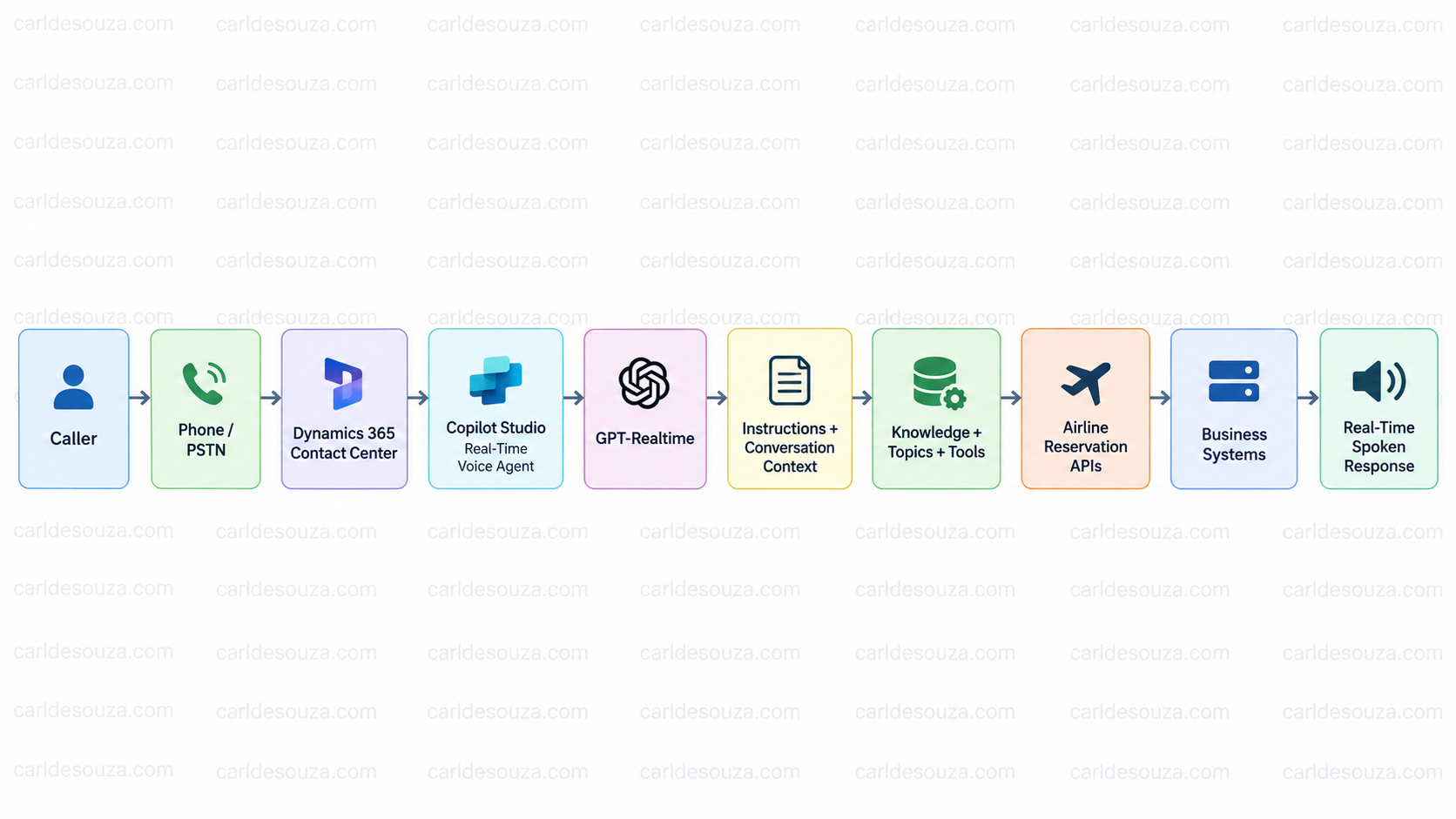
Once we connect several systems together, latency becomes particularly important. Even a delay of a few seconds can make a voice conversation feel unnatural.
There are several things we can do to improve responsiveness:
- Choose the right model. Use a model designed for low-latency realtime voice scenarios when appropriate.
- Tune Voice Activity Detection carefully. Faster end-of-turn detection can reduce latency, but an overly aggressive setting may interrupt callers while they are still speaking.
- Optimize backend API calls. Avoid unnecessary sequential calls where possible.
- Be careful with long-running flows. Power Automate and agent flows can introduce additional synchronous latency in voice scenarios and potential points of failure.
- Minimize unnecessary conversation context. Avoid sending more information to the model than is required for the current request.
- Keep tool responses concise. Return only the fields the agent actually needs instead of large records or payloads.
For our Contoso Air scenario, we ideally want the path to look more like:
Caller speaks → Agent understands request → Required tool call → Concise result → Agent responds
rather than:
Caller speaks → Multiple flows → Multiple sequential API calls → Large payloads → More processing → Response
For operations that naturally take longer, we can also improve the perceived experience with a short conversational message such as:
“One moment while we look that up.”
The general rule is simple: keep the conversational path short, minimize backend round trips, return only the data the agent needs, and tune VAD for the way our callers actually speak.
Test More Than the Happy Path
A five-minute demo can make almost any AI agent look good. A production voice agent needs much more testing.
We need to test scenarios such as:
- Speaking quickly
- Speaking slowly
- Pausing halfway through a sentence
- Interrupting repeatedly
- Changing the subject
- Giving an incorrect confirmation number
- Saying the confirmation number with spaces
- Asking something outside the agent’s scope
- Referring to something from several turns earlier
- Giving incomplete information
- Changing your mind
- Making multiple requests in one sentence
- Asking for a human
Voice conversations are messy, and that is exactly why testing natural variations is so important.
Final Thoughts
Real-time voice agents change how we can think about voice applications in Copilot Studio. Traditionally, we build the menu first and ask the customer to follow it. With a generative real-time agent, we can reverse that model.
The customer can simply say:
“We’re flying tomorrow morning, but something came up. Can we leave later?”
Generative AI understands the intent and the context. Copilot Studio determines which capabilities can help. Tools and topics can interact with the business systems. GPT-Realtime keeps the conversation natural. And deterministic logic can still protect the parts of the process where we need strict business control.
That combination is important.
Instead of designing:
Press 1 → Press 2 → Press 3
we can start with a much more useful question:
What does the customer actually want to do?
Thanks for reading.

Explore AI, agents & Microsoft technology.
I share practical ideas, tutorials, and videos about AI, AI agents, Microsoft technologies, and the Power Platform.
Subscribe on YouTube →